\(\renewcommand\AA{\text{Å}}\)
1. GSASIIscriptable: Scripting Interface
1.1. Summary/Contents
GSASIIscriptable provides routines to use an increasing amount of GSAS-II’s capabilities from Python scripts, without use of the graphical user interface (GUI). GSASIIscriptable can create and access GSAS-II project (.gpx) files and can directly perform image handling, peak fits, refinements… The .gpx files are completely compatible with the GUI, so one can move back and forth between the GUI and scripting when developing scripts. This mode of code development is encouraged to get started with GSAS-II scripting.
GSASIIscriptable is normally used by writing Python commands via this module’s application programming interface (API). (There is also an older mechanism where GSASIIscriptable can be accessed via shell/batch commands, see GSASIIscriptable Command-line Interface, called command-line mode.) Access to GSASIIscriptable via the API is used more widely than via command-line mode and offers many more features. The material below introduces and summarizes use of GSASIIscriptable via the API. Following that, detailed descriptions of all routines are provided in the complete API documentation section.
While the command-line mode provides access a number of features without writing Python scripts via shell/batch commands (see GSASIIscriptable Command-line Interface), use in practice seems somewhat clumsy. Command-line mode is no longer being developed and its use is discouraged.
GSASIIscriptable is designed around the hierarchical structure of .gpx
files, that is seen in the GUI as the GSAS-II data tree. The module
defines wrapper classes
(inheriting from G2ObjectWrapper) for most
GSAS-II data tree items, so most scripting is done with
object-oriented code that operate on different types of data tree
objects. At the top level one has a project
(G2Project) which contains
phases (G2Phase) powder diffraction
histograms ( G2PwdrData).
1.2. Installation of GSASIIscriptable
GSASIIscriptable is included as part of a standard GSAS-II installation that includes the GSAS-II GUI (as described in the installation instructions). People who will will use scripting extensively will still need access to the GUI for some activities, since the scripting API does not cover all features of GSAS-II. Even if that were to be completed, there will still be some things that GSAS-II does with the GUI would be almost impossible to implement without a interactive graphical view of the project.
Nonetheless, there may be times where it does make sense to install GSAS-II without all of the Python packages needed for running the GUI, for example on a compute server or cluster. The minimal requirements for use of GSASIIscriptable are:
python
numpy
scipy
GSASIIscriptable can be used without these packages, but with significantly reduced functionality, so their inclusion is highly recommended:
PyCifRW
requests
There are a few other packages that may be used in GSASIIscriptable, for example to import specific types of powder or image data or perform specific types of computations. They are not commonly needed, but if access is attempted, it should be obvious from error messages:
h5py
xmltodict
pybaselines
seekpath
matplotlib
pillow
More information on Python packages used in GSAS-II is provided in the Scripting Requirements section of the Requirements chapter, which also provides some installation instructions.
1.3. Accessing the GSASIIscriptable Module
When GSAS-II is installed with GSAS2MAIN or GSAS2PKG, or with the gitstrap.py script, or directly with git, the GSAS-II software is installed outside of Python. When the GUI is invoked, a small script or Windows batch file is used to invoke Python with a reference to a file (named G2.py) that starts the GSAS-II GUI.
It is also possible to install GSAS-II inside Python (for example with pixi), but work on this is not yet complete or documented.
When GSASIIscriptable is used, and GSAS-II has been installed outside of Python, some mechanism is needed to provide the location of the GSAS-II files. There are two ways this can be done:
define the GSAS-II installation location in the Python
sys.path, orinstall a reference to GSAS-II inside the Python installation.
The latter method requires an extra installation step, but has the advantage that it allows writing portable GSAS-II scripts.
1.3.1. Explicit GSASIIscriptable Specification
MacOS/Linux:
The example below is for MacOS/Linux and assumes that GSAS-II has been installed in location
/Users/toby/g2main/such that there is a directory/Users/toby/g2main/GSAS-II/GSASIIthat contains all the GSAS-II Python files such asGSASIIscriptable.py. Place code like this into the beginning of your script so that the location of GSAS-II files can be found:import sys sys.path.insert(0,'/Users/toby/g2main/GSAS-II') # needed to find GSASII package from GSASII import GSASIIscriptable as G2sc
Windows:
A similar example, but for Windows, assumes that GSAS-II has been installed in location
C:\Users\toby\gsas2mainsuch that there is a directoryC:\Users\toby\gsas2main\GSAS-II\GSASIIthat contains all the GSAS-II Python files such asGSASIIscriptable.py. Place code like this into the beginning of your script (note that use of forward slashes is deliberate; to use back slashes, they must be doubled or placed in a raw-string,'C:\\Users\\...'orr'C:\Users\...'):import sys sys.path.insert(0,'/Users/toby/gsas2main/GSAS-II') # needed to find GSASII package from GSASII import GSASIIscriptable as G2scNote that the directory that is placed in the path is the one that contains the
GSASIIdirectory. Previously, this path contained this directory, but now is its parent.
1.3.2. Install GSASIIscriptable Location Into Python
As an alternative to defining the location of GSAS-II in every script, you can define the location of GSAS-II inside Python once, but note that this must be done for each version of Python, if you plan to use GSAS-II scripting with more that one. If you have more than one version of GSAS-II installed, only one can be defined for a Python installation, but the previous method, where
sys.pathis modified, can be used with all of the GSAS-II installions.There are three different ways to use GSAS-II to define a location for GSASIIscriptable. You can choose the method that is easiest for you.
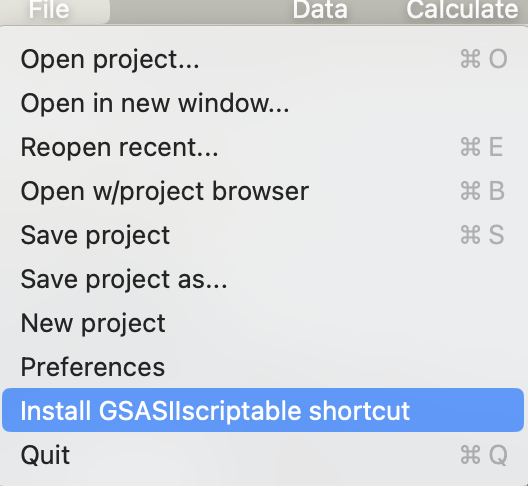
The most easy option is to invoke the “Install GSASIIscriptable shortcut” command in the GSAS-II GUI File menu.
This performs the same actions as below, but since the location of both Python and the GSAS-II files are defined within the GUI, no additional input is needed.
Alternatively, using the commands modeled after the ones above, add the Python command
G2sc.installScriptingShortcut()into your script as:import sys sys.path.insert(0,'/Users/toby/gsas2main/GSAS-II') # needed to find GSASII package from GSASII import GSASIIscriptable as G2sc G2sc.installScriptingShortcut()This only needs to be done once. After the script has been run, remove the command or comment it out.
The third choice is to run two command-line (bash/zsh/DOS,…) commands. This assumes that the intended Python interpreter is already in the path. (If not use a conda activate command.) Note that the directory that is used is the parent of the
GSASIIdirectory (the directory that containsGSASII.)Here are the commands on MacOS/Linux:
% cd /Users/toby/gsas2main/GSAS-II
% python -c "import GSASII.GSASIIscriptable as G2sc; G2sc.installScriptingShortcut()"
On Windows the commands in a cmd.exe window will be similar:
>cd \Users\toby\gsas2main\GSAS-II
>python -c "import GSASII.GSASIIscriptable as G2sc; G2sc.installScriptingShortcut()"
The output from this process on Windows is shown below.

Once any of the above three choices has been completed, a good test to see if GSASIIscriptable is working will be commands:
import G2script as G2sc
print(G2sc.ShowVersions())
as is shown in the image below.

1.3.3. When GSAS-II is Installed Inside Python
If GSAS-II is installed inside of Python, the location of the GSAS-II software is established without any changes to the path so this command should work without using any of the above:
from GSASII import GSASIIscriptable as G2sc
1.4. Application Interface (API) Summary
This section of the documentation provides an overview to API, with full documentation in the API: Complete Documentation section. The typical API use will be with a Python script, such as what is found in Code Examples. Most functionality is provided via the objects and methods summarized below.
1.4.1. Overview of Classes
Scripting class name |
Description |
|---|---|
|
|
|
|
|
|
|
|
|
|
|
|
|
|
|
|
|
1.4.2. Independent Functions
A small number of Scriptable routines do not require existence of a G2Project object.
method |
Use |
|---|---|
Shows Python and GSAS-II version information |
|
Generates a list of unique powder reflections |
|
Sets the amount of output generated when running a script |
|
Installs GSASIIscriptable within Python as G2script |
1.4.3. Class G2Project
All GSASIIscriptable scripts will need to create a
G2Projectobject either for a new GSAS-II project or to read in an existing project (.gpx) file. The table below is not complete but does contain the most commonly used methods in this object:
method |
Use |
|---|---|
Writes the current project to disk. |
|
Used to read in powder diffraction data into a project file. |
|
Defines a “dummy” powder diffraction data that will be simulated after a refinement step. |
|
Reads in an image into a project. |
|
Adds a phase to a project |
|
Adds a PDF entry to a project (does not compute it) |
|
Used to read in a single crystal diffraction dataset into a project file. |
|
Adds a small-angle scattering histogram to a project |
|
Provides a list of histograms in the current project, as |
|
Finds a histogram from an object, name or random id reference, returning a
a |
|
Determines the histogram type from an object, name or random id reference. |
|
Provides a list of phases defined in the current project, as |
|
Finds a phase from an object, name or random id reference, returning a
a |
|
Provides a list of images in the current project, as |
|
Finds an image from an object, name or random id reference, returning a
a |
|
Provides a list of PDFs in the current project, as |
|
Returns a |
|
This is passed a list of dictionaries, where each dict defines a refinement step. Passing a list with a single empty dict initiates a refinement with the current parameters and flags. A refinement dict sets up a single refinement step (as described in Project-level Parameter Dict). Also see Refinement recipe. |
|
This is passed a single dict which is used to set parameters and flags.
These actions can be performed also in |
|
Retrieves the value and esd for a parameter |
|
Retrieves values and covariance for a set of refined parameters |
|
Set overall GSAS-II control settings such as number of cycles and to set parameter limits.
This is also used to set up a sequential
fit. (Also see |
|
Retrieves the shifts and sigma values from the last least-squares cycle |
|
Performs a global calibration fit with images at multiple distance settings. |
|
Retrieves constraint definition entries. |
|
Adds a hold constraint on one or more variables |
|
Adds an equivalence constraint on two or more variables |
|
Adds an equation-type constraint on two or more variables |
|
Adds an new variable as a constraint on two or more variables |
|
Determines the parameters that will have the greatest impact on the fit if refined |
|
Find variables where parameters have refined out of the parameter limit ranges.
Note that parameter limits are set using |
|
Adds or removes variables from the list where parameters have refined outside of their limits.
Note that parameter limits are set using |
1.4.4. Class G2Phase
Another common object in GSASIIscriptable scripts is
G2Phase, used to encapsulate each phase in a project, with commonly used methods:
method |
Use |
|---|---|
Provides a mechanism to set values and refinement flags for the phase. See Phase parameters
for more details. This information also can be supplied within a call
to |
|
Unsets refinement flags for the phase. |
|
Provides a mechanism to set values and refinement flags for parameters specific to both this phase and
one of its histograms. See Histogram-and-phase parameters. This information also can be supplied within
a call to |
|
Clears refinement flags specific to both this phase and one of its histograms. |
|
Returns values of parameters specific to both this phase and one of its histograms. |
|
Copies HAP settings between from one phase/histogram and to other histograms in same phase. |
|
Sets or retrieves values for some of the parameters specific to both this phase and one or more of its histograms. |
|
Returns a list of atoms in the phase |
|
Returns an atom from its label |
|
Adds an atom to a phase |
|
Returns a list of histograms linked to the phase |
|
Returns unit cell parameters (also see |
|
Writes a CIF for the phase |
|
Sets sample broadening parameters |
|
Clears any previously defined bond distance restraint(s) for the selected phase |
|
Finds and defines new bond distance restraint(s) for the selected phase |
|
Sets the weighting factor for the bond distance restraints |
|
Shifts the atom coordinates from an Origin 1 setting to the Origin 2 setting |
1.4.5. Class G2PwdrData
Another common object in GSASIIscriptable scripts is
G2PwdrData, which encapsulate each powder diffraction histogram in a project, with commonly used methods:
method |
Use |
|---|---|
Provides a mechanism to set values and refinement flags for the powder histogram. See Histogram parameters for details. |
|
Unsets refinement flags for the powder histogram. |
|
Reports R-factors etc. for the powder histogram (also see |
|
Adds a background peak to the histogram. Also see |
|
Fits background to the specified fixed points. |
|
Sets a background histogram that will be subtracted (point by point) from the current histogram. |
|
Estimates the background and sets the fixed background points from that. |
|
Provides access to the diffraction data associated with the histogram. |
|
Provides access to the reflection lists for the histogram. |
|
Writes the diffraction data or reflection list into a file |
|
Adds a peak to the peak list. Also see Peak Fitting. |
|
Sets refinement flags for peaks |
|
Starts a peak/background fitting cycle, returns refinement results |
|
Provides access to the peak list data structure |
|
Provides the peak list parameter values |
|
Writes the peak parameters to a text file |
|
Reads or sets the region of data used in fitting (histogram limits) |
|
Reads or sets regions of powder data that will be ignored |
|
Reports mass (weight) fractions and their uncertainties |
1.4.6. Class G2Single
A less commonly-used object in GSASIIscriptable scripts is
G2Single, which will encapsulate each single crystal diffraction histogram in a project. At present, very few methods are provided:
method |
Use |
|---|---|
Provides a mechanism to set refinement flags for the single crystal histogram. See Histogram parameters for details. |
|
Unsets refinement flags for the single crystal powder histogram. |
|
Writes the reflection list into a file |
1.4.7. Class G2Image
When working with images, there will be a
G2Imageobject for each image (also seeadd_image()andimages()).
method |
Use |
|---|---|
Invokes a recalibration fit starting from the current Image Controls calibration coefficients. |
|
Invokes an image integration All parameters Image Controls will have previously been set. |
|
Searches for “bad” pixels creating a pixel mask. |
|
Set an Image Controls parameter in the current image. |
|
Return an Image Controls parameter in the current image. |
|
Get the names of Image Controls parameters. |
|
Load controls from a .imctrl file (also see |
|
Load masks from a .immask file. |
|
Set a refinement flag for Image Controls parameter in the current image.
(Also see |
|
Set a calibrant type (or show choices) for the current image. |
|
Set a image to be used as a background/dark/gain map image. |
|
Returns the Image Controls dict for the current image. |
|
Updates the Image Controls dict for the current image with specified key/value pairs. |
|
Returns the Masks dict for the current image. |
|
Updates the Masks dict for the current image with specified key/value pairs. |
|
Returns the image array for the current image. |
|
Computes the set of 2theta-azimuth mapping matrices to integrate the current image. |
|
Computes the masking map for the current image for integration. |
|
Computes the 2theta mapping matrix to determine a pixel mask. |
|
Computes the Frame mask needed to determine a pixel mask. |
|
Returns True if fast pixel masking is available. |
|
Clears a saved image from memory, if one is present. |
|
Clears a saved Pixel map from the project, if one is present. |
|
Loads a Pixel map from an array |
1.4.8. Class G2PDF
To work with PDF entries, object
G2PDF, encapsulates a PDF entry with methods:
method |
Use |
|---|---|
Used to write G(r), etc. as a file |
|
Computes the PDF using parameters in the object |
|
Optimizes selected PDF parameters |
|
Sets the histograms used for sample background, container, etc. |
|
Sets the chemical formula for the sample |
1.4.9. Class G2SmallAngle
To work with Small Angle (currently only SASD entries), object
G2SmallAngle, encapsulates a SASD entry. At present no methods are provided.
1.4.10. Class G2SeqRefRes
To work with Sequential Refinement results, object
G2SeqRefRes, encapsulates the sequential refinement table with methods:
method |
Use |
|---|---|
Provides a list of histograms used in the Sequential Refinement |
|
Returns cell dimensions and standard uncertainties for a phase and histogram from the Sequential Refinement |
|
Retrieves the value and esd for a parameter from a particular histogram in the Sequential Refinement |
|
Retrieves values and covariance for a set of refined parameters for a particular histogram |
1.4.11. Class G2AtomRecord
When working with phases,
G2AtomRecordmethods provide access to the contents of each atom in a phase. This provides access to atom values via class “properties” that can be used to get values of much of the atoms associated settings, as below. Most can also be used to set values via “setter” methods. See theG2AtomRecorddocs and source code.
method/property |
Use |
|---|---|
Reference as |
|
Reference as |
|
Reference as |
|
Reference class property |
|
Reference as |
|
Reference class property |
|
Reference as |
|
Reference as |
|
Reference as |
|
Reference pseudo class variable |
1.5. Refinement parameters
While scripts can be written that setup refinements by changing individual parameters through calls to the methods associated with objects that wrap each data tree item, many of these actions can be combined into fairly complex dict structures to conduct refinement steps. Use of these dicts is required with the GSASIIscriptable Command-line Interface. This section of the documentation describes these dicts.
1.5.1. Project-level Parameter Dict
As noted below (Refinement parameter types), there are three types of refinement parameters,
which can be accessed individually by the objects that encapsulate individual phases and histograms
but it will often be simplest to create a composite dictionary
that is used at the project-level. A dict is created with keys
“set” and “clear” that can be supplied to set_refinement()
(or do_refinements(), see Refinement recipe below) that will
determine parameter values and will determine which parameters will be refined.
The specific keys and subkeys that can be used are defined in tables Histogram parameters, Phase parameters and Histogram-and-phase parameters.
Note that optionally a list of histograms and/or phases can be supplied in the call to
set_refinement(), but if not specified, the default is to use all defined
phases and histograms.
As an example:
pardict = {'set': { 'Limits': [0.8, 12.0],
                   'Sample Parameters': ['Absorption', 'Contrast', 'DisplaceX'],
                   'Background': {'type': 'chebyschev-1', 'refine': True,
                                  'peaks':[[0,True],[1,1,1]] }},
          'clear': {'Instrument Parameters': ['U', 'V', 'W']}}
my_project.set_refinement(pardict)
1.5.2. Refinement recipe
Building on the Project-level Parameter Dict,
it is possible to specify a sequence of refinement actions as a list of
these dicts and supplying this list
as an argument to do_refinements().
As an example, this code performs the same actions as in the example in the section above:
pardict = {'set': { 'Limits': [0.8, 12.0],
                   'Sample Parameters': ['Absorption', 'Contrast', 'DisplaceX'],
                   'Background': {'type': 'chebyschev-1', 'refine': True}},
          'clear': {'Instrument Parameters': ['U', 'V', 'W']}}
my_project.do_refinements([pardict])
However, in addition to setting a number of parameters, this example will perform a refinement as well, after setting the parameters. More than one refinement can be performed by including more than one dict in the list.
In this example, two refinement steps will be performed:
my_project.do_refinements([pardict,pardict1])
The keys defined in the following table
may be used in a dict supplied to do_refinements(). Note that keys histograms
and phases are used to limit actions to specific sets of parameters within the project.
key |
explanation |
|---|---|
set |
Specifies a dict with keys and subkeys as described in the Specifying Refinement Parameters section. Items listed here will be set to be refined. |
clear |
Specifies a dict, as above for set, except that parameters are cleared and thus will not be refined. |
once |
Specifies a dict as above for set, except that parameters are set for the next cycle of refinement and are cleared once the refinement step is completed. |
skip |
Normally, once parameters are processed with a set/clear/once action(s), a refinement is started. If skip is defined as True (or any other value) the refinement step is not performed. |
output |
If a file name is specified for output is will be used to save the current refinement. |
histograms |
Should contain a list of histogram(s) to be used for the set/clear/once action(s) on Histogram parameters or Histogram-and-phase parameters. Note that this will be ignored for Phase parameters. Histograms may be specified as a list of strings [(‘PWDR …’),…], indices [0,1,2] or as list of objects [hist1, hist2]. |
phases |
Should contain a list of phase(s) to be used for the set/clear/once action(s) on Phase parameters or Histogram-and-phase parameters. Note that this will be ignored for Histogram parameters. Phases may be specified as a list of strings [(‘Phase name’),…], indices [0,1,2] or as list of objects [phase0, phase2]. |
call |
Specifies a function to call after a refinement is completed.
The value supplied can be the object (typically a function)
that will be called or a string that will evaluate (in the
namespace inside
|
callargs |
Provides a list of arguments that will be passed to the function in call (if any). If call is defined and callargs is not, the current <tt>G2Project</tt> is passed as a single argument. |
An example that performs a series of refinement steps follows:
reflist = [
        {"set": { "Limits": { "low": 0.7 },
                  "Background": { "no. coeffs": 3,
                                  "refine": True }}},
        {"set": { "LeBail": True,
                  "Cell": True }},
        {"set": { "Sample Parameters": ["DisplaceX"]}},
        {"set": { "Instrument Parameters": ["U", "V", "W", "X", "Y"]}},
        {"set": { "Mustrain": { "type": "uniaxial",
                                "refine": "equatorial",
                                "direction": [0, 0, 1]}}},
        {"set": { "Mustrain": { "type": "uniaxial",
                                "refine": "axial"}}},
        {"clear": { "LeBail": True},
         "set": { "Atoms": { "Mn": "X" }}},
        {"set": { "Atoms": { "O1": "X", "O2": "X" }}},]
my_project.do_refinements(reflist)
In this example, a separate refinement step will be performed for each dict in the list. The keyword “skip” can be used to specify a dict that should not include a refinement. Note that in the second from last refinement step, parameters are both set and cleared.
1.5.3. Refinement parameter types
Note that parameters and refinement flags used in GSAS-II fall into three classes:
Histogram: There will be a set of these for each dataset loaded into a project file. The parameters available depend on the type of histogram (Bragg-Brentano, Single-Crystal, TOF,…). Typical Histogram parameters include the overall scale factor, background, instrument and sample parameters; see the Histogram parameters table for a list of the histogram parameters where access has been provided.
Phase: There will be a set of these for each phase loaded into a project file. While some parameters are found in all types of phases, others are only found in certain types (modulated, magnetic, protein…). Typical phase parameters include unit cell lengths and atomic positions; see the Phase parameters table for a list of the phase parameters where access has been provided.
Histogram-and-phase (HAP): There is a set of these for every histogram that is associated with each phase, so that if there are
Nphases andMhistograms, there can beN*Mtotal sets of “HAP” parameters sets (fewer if all histograms are not linked to all phases.) Typical HAP parameters include the phase fractions, sample microstrain and crystallite size broadening terms, hydrostatic strain perturbations of the unit cell and preferred orientation values. See the Histogram-and-phase parameters table for the HAP parameters where access has been provided.
1.6. Specifying Refinement Parameters
Refinement parameter values and flags to turn refinement on and off are specified within dictionaries, where the details of these dicts are organized depends on the type of parameter (see Refinement parameter types), with a different set of keys (as described below) for each of the three types of parameters.
1.6.1. Histogram parameters
This table describes the dictionaries supplied to set_refinements()
and clear_refinements(). As an example,
hist.set_refinements({"Background": {"no. coeffs": 3, "refine": True},
                      "Sample Parameters": ["Scale"],
                      "Limits": [10000, 40000]})
With do_refinements(), these parameters should be placed inside a dict with a key
set, clear, or once. Values will be set for all histograms, unless the histograms
key is used to define specific histograms. As an example:
gsas_proj.do_refinements([
    {'set': {
        'Background': {'no. coeffs': 3, 'refine': True},
        'Sample Parameters': ['Scale'],
        'Limits': [10000, 40000]},
    'histograms': [1,2]}
                          ])
Note that below in the Instrument Parameters section, related profile parameters (such as U and V) are grouped together but separated by commas to save space in the table.
key |
subkey |
explanation |
|---|---|---|
Limits |
The range of 2-theta (degrees) or TOF (in microsec) range of values to use. Can be either a dictionary of ‘low’ and/or ‘high’, or a list of 2 items [low, high] Available for powder histograms only. |
|
low |
Sets the low limit |
|
high |
Sets the high limit |
|
Sample Parameters |
Should be provided as a list of subkeys to set or clear refinement flags for, e.g. [‘DisplaceX’, ‘Scale’] Available for powder histograms only. |
|
Absorption |
||
Contrast |
||
DisplaceX |
Sample displacement along the X direction (Debye-Scherrer) |
|
DisplaceY |
Sample displacement along the Y direction (Debye-Scherrer) |
|
Shift |
Bragg-Brentano sample displacement |
|
Scale |
Histogram Scale factor |
|
Background |
Sample background. Value will be a dict or
a boolean. If True or False, the refine
parameter for background is set to that.
Available for powder histograms only.
Note that background peaks are not handled
via this; see
|
|
type |
The background model, e.g. ‘chebyschev-1’ |
|
refine |
The value of the refine flag, boolean |
|
‘no. coeffs’ |
Number of coefficients to use, integer |
|
coeffs |
List of floats, literal values for background |
|
FixedPoints |
List of (2-theta, intensity) values for fixed points |
|
‘fit fixed points’ |
If True, triggers a fit to the fixed points to be calculated. It is calculated when this key is detected, regardless of calls to refine. |
|
peaks |
Specifies a set of flags for refining background peaks as a nested list. There may be an item for each defined background peak (or fewer) and each item is a list with the flag values for pos,int,sig & gam (fewer than 4 values are allowed). |
|
Instrument Parameters |
As in Sample Parameters, provide as a list of subkeys to set or clear refinement flags, e.g. [‘X’, ‘Y’, ‘Zero’, ‘SH/L’] Available for powder histograms only. |
|
U, V, W |
Gaussian peak profile terms |
|
X, Y, Z |
Lorentzian peak profile terms |
|
alpha, beta-0, beta-1, beta-q, |
TOF profile terms |
|
sig-0, sig-1, sig-2, sig-q |
TOF profile terms |
|
difA, difB, difC |
TOF Calibration constants |
|
Zero |
Zero shift |
|
SH/L |
Finger-Cox-Jephcoat low-angle peak asymmetry |
|
Polariz. |
Polarization parameter |
|
Lam |
Lambda, the incident wavelength |
|
Single xtal |
As in Sample Parameters, provide as a list of subkeys to set or clear refinement flags, e.g. […]. Available for single crystal histograms only. |
|
Scale |
Single crystal scale factor |
|
BabA, BabU |
Babinet A & U parameters |
|
Eg, Es, Ep |
Extinction parameters |
|
Flack |
Flack absolute configuration parameter |
1.6.2. Phase parameters
This table describes the dictionaries supplied to set_refinements()
and clear_refinements(). With do_refinements(),
these parameters should be placed inside a dict with a key
set, clear, or once. Values will be set for all phases, unless the phases
key is used to define specific phase(s).
key |
explanation |
|---|---|
Cell |
Whether or not to refine the unit cell. |
Atoms |
Dictionary of atoms and refinement flags. Each key should be an atom label, e.g. ‘O3’, ‘Mn5’, and each value should be a string defining what values to refine. Values can be any combination of ‘F’ for site fraction, ‘X’ for position, and ‘U’ for Debye-Waller factor |
LeBail |
Enables LeBail intensity extraction. |
1.6.3. Histogram-and-phase parameters
This table describes the dictionaries supplied to set_HAP_refinements()
and clear_HAP_refinements(). When supplied to
do_refinements(), these parameters should be placed inside a dict with a key
set, clear, or once. Values will be set for all histograms used in each phase,
unless the histograms and phases keys are used to define specific phases and histograms.
key |
subkey |
explanation |
|---|---|---|
Babinet |
Should be a list of the following subkeys. If not, assumes both BabA and BabU |
|
BabA |
||
BabU |
||
Extinction |
Boolean, True to refine. |
|
HStrain |
Boolean or list/tuple, True to refine all appropriate Dij terms or False to not refine any. If a list/tuple, will be a set of True & False values for each Dij term; number of items must match number of terms. |
|
Mustrain |
||
type |
Mustrain model. One of ‘isotropic’, ‘uniaxial’, or ‘generalized’. This should be specified to change the model. |
|
direction |
For uniaxial only. A list of three integers, the [hkl] direction of the axis. |
|
refine |
Usually boolean, set to True to refine. or False to clear. For uniaxial model, can specify a value of ‘axial’ or ‘equatorial’ to set that flag to True or a single boolean sets both axial and equatorial. |
|
Size |
||
type |
Size broadening model. One of ‘isotropic’, ‘uniaxial’, or ‘ellipsoid’. This should be specified to change from the current. |
|
direction |
For uniaxial only. A list of three integers, the [hkl] direction of the axis. |
|
refine |
Boolean, True to refine. |
|
value |
float, size value in microns |
|
Pref.Ori. |
Boolean, True to refine |
|
Show |
Boolean, True to refine |
|
Use |
Boolean, True to refine |
|
Scale |
Phase fraction; Boolean, True to refine |
|
PhaseFraction |
PhaseFraction can also be used in place of
Scale for the routines that access HAP
parameters:
|
1.6.4. Histogram/Phase objects
Each phase and powder histogram in a G2Project object has an associated
object. Parameters within each individual object can be turned on and off by calling
set_refinements() or clear_refinements()
for histogram parameters;
set_refinements() or clear_refinements()
for phase parameters; and set_HAP_refinements() or
clear_HAP_refinements(). As an example, if some_histogram is a histogram object (of type G2PwdrData), use this to set parameters in that histogram:
params = { 'Limits': [0.8, 12.0],
           'Sample Parameters': ['Absorption', 'Contrast', 'DisplaceX'],
           'Background': {'type': 'chebyschev-1', 'refine': True}}
some_histogram.set_refinements(params)
Likewise to turn refinement flags on, use code such as this:
params = { 'Instrument Parameters': ['U', 'V', 'W']}
some_histogram.set_refinements(params)
and to turn these refinement flags, off use this (Note that the
.clear_refinements() methods will usually will turn off refinement even
if a refinement parameter is set in the dict to True.):
params = { 'Instrument Parameters': ['U', 'V', 'W']}
some_histogram.clear_refinements(params)
For phase parameters, use code such as this:
params = { 'LeBail': True, 'Cell': True,
           'Atoms': { 'Mn1': 'X',
                      'O3': 'XU',
                      'V4': 'FXU'}}
some_histogram.set_refinements(params)
and here is an example for HAP parameters:
params = { 'Babinet': 'BabA',
           'Extinction': True,
           'Mustrain': { 'type': 'uniaxial',
                         'direction': [0, 0, 1],
                         'refine': True}}
some_phase.set_HAP_refinements(params)
Note that the parameters must match the object type and method (phase vs. histogram vs. HAP).
1.7. Access to other parameter settings
There are several hundred different types of values that can be stored in a
GSAS-II project (.gpx) file. All can be changed from the GUI but only a
subset have direct mechanism implemented for change from the GSASIIscriptable
API. In practice all parameters in a .gpx file can be edited via scripting,
but sometimes determining what should be set to implement a parameter
change can be complex.
Several routines, getHAPentryList(),
getPhaseEntryList() and getHistEntryList()
(and their related get…Value and set.Value entries),
provide a mechanism to discover what the GUI is changing inside a .gpx file.
As an example, a user in changing the data type for a histogram from Debye-Scherrer mode to Bragg-Brentano. This capability is not directly exposed in the API. To find out what changes when the histogram type is changed we can create a short script that displays the contents of all the histogram settings:
gpx = G2sc.G2Project('/tmp/test.gpx')
h = gpx.histograms()[0]
for h in h.getHistEntryList():
    print(h)
This can be run with a command like this:
python test.py > before.txt
(This will create file before.txt, which will contain hundreds of lines.)
At this point open the project file, test.gpx in the GSAS-II GUI and
change in Histogram/Sample Parameters the diffractometer type from Debye-Scherrer
mode to Bragg-Brentano and then save the file.
Rerun the previous script creating a new file:
python test.py > after.txt
Finally look for the differences between files before.txt and after.txt using a tool
such as diff (on Linux/OS X) or fc (in Windows).
in Windows:
Z:\>fc before.txt after.txt
Comparing files before.txt and after.txt
***** before.txt
       fill_value = 1e+20)
, 'PWDR Co_PCP_Act_d900-00030.fxye Bank 1', 'PWDR Co_PCP_Act_d900-00030.fxye Ban
k 1'])
(['Comments'], <class 'list'>, ['Co_PCP_Act_d900-00030.tif #0001 Azm= 180.00'])
***** AFTER.TXT
       fill_value = 1e+20)
, 'PWDR Co_PCP_Act_d900-00030.fxye Bank 1', 'PWDR Co_PCP_Act_d900-00030.fxye Ban
k 1', 'PWDR Co_PCP_Act_d900-00030.fxye Bank 1']

(['Comments'], <class 'list'>, ['Co_PCP_Act_d900-00030.tif #0001 Azm= 180.00'])
*****

***** before.txt
(['Sample Parameters', 'Scale'], <class 'list'>, [1.276313196832068, True])
(['Sample Parameters', 'Type'], <class 'str'>, 'Debye-Scherrer')
(['Sample Parameters', 'Absorption'], <class 'list'>, [0.0, False])
***** AFTER.TXT
(['Sample Parameters', 'Scale'], <class 'list'>, [1.276313196832068, True])
(['Sample Parameters', 'Type'], <class 'str'>, 'Bragg-Brentano')
(['Sample Parameters', 'Absorption'], <class 'list'>, [0.0, False])
*****
in Linux/Mac:
bht14: toby$ diff before.txt after.txt
103c103
< , 'PWDR Co_PCP_Act_d900-00030.fxye Bank 1', 'PWDR Co_PCP_Act_d900-00030.fxye Bank 1'])
---
> , 'PWDR Co_PCP_Act_d900-00030.fxye Bank 1', 'PWDR Co_PCP_Act_d900-00030.fxye Bank 1', 'PWDR Co_PCP_Act_d900-00030.fxye Bank 1'])
111c111
< (['Sample Parameters', 'Type'], <class 'str'>, 'Debye-Scherrer')
---
> (['Sample Parameters', 'Type'], <class 'str'>, 'Bragg-Brentano')
From this we can see there are two changes that took place. One is fairly obscure, where the histogram name is added to a list, which can be ignored, but the second change occurs in a straight-forward way and we discover that a simple call:
h.setHistEntryValue(['Sample Parameters', 'Type'], 'Bragg-Brentano')
can be used to change the histogram type.
1.8. Code Examples
1.8.1. Accessing GSASIIscriptable
As discussed in the Accessing the GSASIIscriptable Module section of this chapter, GSAS-II is commonly installed outside of a Python installation, which means that Python must be instructed on how to access the GSASII package. In that section three methods are provided for defining G2sc as the location of the GSASIIscriptable module. The scripting examples below all assume that one of choices for import statements has been executed to provide access to GSASIIscriptable.
1.8.2. Status Information
To find information on Python, Python packages and the GSAS-II version, one can call the
ShowVersions() function. This will show versions and
install locations.
print(f'Version information:\n{G2sc.ShowVersions()}')
which produces output like this:
setting up GSASIIscriptable from /Users/toby/G2/git/g2full/GSAS-II/GSASII
Version information:
  Python      3.11.9:  from /Users/toby/py/mf3/envs/py311/bin/python
  numpy       1.26.4:
  scipy       1.13.0:
  IPython     8.22.2:
  GSAS-II:    641a65, 24-May-2024 10:16 (0.5 days old). Last tag: #5789

GSAS-II location: /Users/toby/G2/git/g2full/GSAS-II/GSASII
Binary location:  /Users/toby/G2/git/g2full/GSAS-II/GSASII-bin/mac_arm_p3.11_n1.26
1.8.3. Peak Fitting
Peak refinement is performed with routines
add_peak(), set_peakFlags() and
refine_peaks(). Method Export_peaks() and
properties Peaks and PeakList
provide ways to access the results. Note that when peak parameters are
refined with refine_peaks(), the background may also
be refined. Use set_refinements() to change background
settings and the range of data used in the fit. See below for an example
peak refinement script, where the data files are taken from the
“Rietveld refinement with CuKa lab Bragg-Brentano powder data” tutorial
(in https://advancedphotonsource.github.io/GSAS-II-tutorials/LabData/data/).
import os
datadir = os.path.expanduser("~/Scratch/peakfit")
PathWrap = lambda fil: os.path.join(datadir,fil)
gpx = G2sc.G2Project(newgpx=PathWrap('pkfit.gpx'))
hist = gpx.add_powder_histogram(PathWrap('FAP.XRA'), PathWrap('INST_XRY.PRM'),
                                fmthint='GSAS powder')
hist.set_refinements({'Limits': [16.,24.],
      'Background': {"no. coeffs": 2,'type': 'chebyschev-1', 'refine': True}
                     })
peak1 = hist.add_peak(1, ttheta=16.8)
peak2 = hist.add_peak(1, ttheta=18.9)
peak3 = hist.add_peak(1, ttheta=21.8)
peak4 = hist.add_peak(1, ttheta=22.9)
hist.set_peakFlags(area=True)
hist.refine_peaks()
hist.set_peakFlags(area=True,pos=True)
hist.refine_peaks()
hist.set_peakFlags(area=True, pos=True, sig=True, gam=True)
res = hist.refine_peaks()
print('peak positions: ',[i[0] for i in hist.PeakList])
for i in range(len(hist.Peaks['peaks'])):
    print('peak',i,'pos=',hist.Peaks['peaks'][i][0],'sig=',hist.Peaks['sigDict']['pos'+str(i)])
hist.Export_peaks('pkfit.txt')
#gpx.save()  # gpx file is not written without this
1.8.4. Pattern Simulation
This shows two examples where a structure is read from a CIF, a pattern is computed using a instrument parameter file to specify the probe type (neutrons here) and wavelength.
The first example uses a CW neutron instrument parameter file. The pattern is computed over a 2θ range of 5 to 120 degrees with 1000 points. The pattern and reflection list are written into files. Data files are found in the Scripting Tutorial.
import os
datadir = "/Users/toby/software/G2/Tutorials/PythonScript/data"
PathWrap = lambda fil: os.path.join(datadir,fil)
gpx = G2sc.G2Project(newgpx='PbSO4sim.gpx') # create a project
phase0 = gpx.add_phase(PathWrap("PbSO4-Wyckoff.cif"),
         phasename="PbSO4",fmthint='CIF') # add a phase to the project
# add a simulated histogram and link it to the previous phase(s)
hist1 = gpx.add_simulated_powder_histogram("PbSO4 simulation",
            PathWrap("inst_d1a.prm"),5.,120.,Npoints=1000,
            phases=gpx.phases(),scale=500000.)
gpx.do_refinements()   # calculate pattern
gpx.save()
# save results
gpx.histogram(0).Export('PbSO4data','.csv','hist') # data
gpx.histogram(0).Export('PbSO4refl','.csv','refl') # reflections
This example uses bank#2 from a TOF neutron instrument parameter file. The pattern is computed over a TOF range of 14 to 35 milliseconds with the default of 2500 points. This uses the same CIF as in the example before, but the instrument is found in the TOF-CW Joint Refinement Tutorial tutorial.
import os
cifdir = "/Users/toby/software/G2/Tutorials/PythonScript/data"
datadir = "/Users/toby/software/G2/Tutorials/TOF-CW Joint Refinement/data"
gpx = G2sc.G2Project(newgpx='/tmp/PbSO4simT.gpx') # create a project
phase0 = gpx.add_phase(os.path.join(cifdir,"PbSO4-Wyckoff.cif"),
         phasename="PbSO4",fmthint='CIF') # add a phase to the project
hist1 = gpx.add_simulated_powder_histogram("PbSO4 simulation",
            os.path.join(datadir,"POWGEN_1066.instprm"),14.,35.,
            phases=gpx.phases(),ibank=2)
gpx.do_refinements([{}])
gpx.save()
1.8.5. Simple Refinement
GSASIIscriptable can be used to setup and perform simple refinements. This example reads in an existing project (.gpx) file, adds a background peak, changes some refinement flags and performs a refinement.
datadir = "/Users/Scratch/"
gpx = G2sc.G2Project(os.path.join(datadir,'test2.gpx'))
gpx.histogram(0).add_back_peak(4.5,30000,5000,0)
pardict = {'set': {'Sample Parameters': ['Absorption', 'Contrast', 'DisplaceX'],
                   'Background': {'type': 'chebyschev-1', 'refine': True,
                                  'peaks':[[0,True]]}}}
gpx.set_refinement(pardict)
1.8.6. Sequential Refinement
GSASIIscriptable can be used to setup and perform sequential refinements. This example script is used to take the single-dataset fit at the end of Step 1 of the Sequential Refinement tutorial and turn on and off refinement flags, add histograms and setup the sequential fit, which is then run:
import os,glob
datadir = os.path.expanduser("~/Scratch/SeqTut2019Mar")
PathWrap = lambda fil: os.path.join(datadir,fil)
# load and rename project
gpx = G2sc.G2Project(PathWrap('7Konly.gpx'))
gpx.save(PathWrap('SeqRef.gpx'))
# turn off some variables; turn on Dijs
for p in gpx.phases():
    p.set_refinements({"Cell": False})
gpx.phase(0).set_HAP_refinements(
    {'Scale': False,
     "Size": {'type':'isotropic', 'refine': False},
     "Mustrain": {'type':'uniaxial', 'refine': False},
     "HStrain":True,})
gpx.phase(1).set_HAP_refinements({'Scale': False})
gpx.histogram(0).clear_refinements({'Background':False,
                 'Sample Parameters':['DisplaceX'],})
gpx.histogram(0).ref_back_peak(0,[])
gpx.phase(1).set_HAP_refinements({"HStrain":(1,1,1,0)})
for fil in sorted(glob.glob(PathWrap('*.fxye'))): # load in remaining fxye files
    if '00' in fil: continue
    gpx.add_powder_histogram(fil, PathWrap('OH_00.prm'), fmthint="GSAS powder",phases='all')
# copy HAP values, background, instrument params. & limits, not sample params.
gpx.copyHistParms(0,'all',['b','i','l'])
for p in gpx.phases(): p.copyHAPvalues(0,'all')
# setup and launch sequential fit
gpx.set_Controls('sequential',gpx.histograms())
gpx.set_Controls('cycles',10)
gpx.set_Controls('seqCopy',True)
gpx.refine()
1.8.7. Image Processing
A sample script where an image is read, assigned calibration values from a file and then integrated follows. The data files are found in the Scripting Tutorial.
import os
datadir = "/tmp"
PathWrap = lambda fil: os.path.join(datadir,fil)

gpx = G2sc.G2Project(newgpx=PathWrap('inttest.gpx'))
imlst = gpx.add_image(PathWrap('Si_free_dc800_1-00000.tif'),fmthint="TIF")
imlst[0].loadControls(PathWrap('Si_free_dc800_1-00000.imctrl'))
pwdrList = imlst[0].Integrate()
gpx.save()
This example shows a computation similar to what is done in tutorial Area Detector Calibration with Multiple Distances
import os,glob
PathWrap = lambda fil: os.path.join(
    "/Users/toby/wp/Active/MultidistanceCalibration/multimg",
    fil)

gpx = G2sc.G2Project(newgpx='/tmp/img.gpx')
for f in glob.glob(PathWrap('*.tif')):
    im = gpx.add_image(f,fmthint="TIF")
# image parameter settings
defImgVals = {'wavelength': 0.24152, 'center': [206., 205.],
  'pixLimit': 2,  'cutoff': 5.0, 'DetDepth': 0.055,'calibdmin': 1.,}
# set controls and vary options, then fit
for img in gpx.images():
    img.setCalibrant('Si    SRM640c')
    img.setVary('*',False)
    img.setVary(['det-X', 'det-Y', 'phi', 'tilt', 'wave'], True)
    img.setControls(defImgVals)
    img.Recalibrate()
    img.Recalibrate() # 2nd run better insures convergence
gpx.save()
# make dict of images for sorting
images = {img.getControl('setdist'):img for img in gpx.images()}
# show values
for key in sorted(images.keys()):
    img = images[key]
    c = img.getControls()
    print(c['distance'],c['wavelength'])
1.8.8. Image Calibration
This example performs a number of cycles of constrained fitting.
A project is created with the images found in a directory, setting initial
parameters as the images are read. The initial values
for the calibration are not very good, so a Recalibrate() is done
to quickly improve the fit. Once that is done, a fit of all images is performed
where the wavelength, an offset and detector orientation are constrained to
be the same for all images. The detector penetration correction is then added.
Note that as the calibration values improve, the algorithm is able to find more
points on diffraction rings to use for calibration and the number of “ring picks”
increase. The calibration is repeated until that stops increasing significantly (<10%).
Detector control files are then created.
The files used for this exercise are found in the
Area Detector Calibration Tutorial
(see
Area Detector Calibration with Multiple Distances ).
import os,glob
PathWrap = lambda fil: os.path.join(
    "/Users/toby/wp/Active/MultidistanceCalibration/multimg",
    fil)

gpx = G2sc.G2Project(newgpx='/tmp/calib.gpx')
for f in glob.glob(PathWrap('*.tif')):
    im = gpx.add_image(f,fmthint="TIF")
# starting image parameter settings
defImgVals = {'wavelength': 0.240, 'center': [206., 205.],
  'pixLimit': 2,  'cutoff': 5.0, 'DetDepth': 0.03,'calibdmin': 0.5,}
# set controls and vary options, then initial fit
for img in gpx.images():
    img.setCalibrant('Si    SRM640c')
    img.setVary('*',False)
    img.setVary(['det-X', 'det-Y', 'phi', 'tilt', 'wave'], True)
    img.setControls(defImgVals)
    if img.getControl('setdist') > 900:
        img.setControls({'calibdmin': 1.,})
    img.Recalibrate()
G2sc.SetPrintLevel('warn') # cut down on output
result,covData = gpx.imageMultiDistCalib()
print('1st global fit: initial ring picks',covData['obs'])
print({i:result[i] for i in result if '-' not in i})
# add parameter to all images & refit multiple times
for img in gpx.images(): img.setVary('dep',True)
ringpicks = covData['obs']
delta = ringpicks
while delta > ringpicks/10:
    result,covData = gpx.imageMultiDistCalib(verbose=False)
    delta = covData['obs'] - ringpicks
    print('ring picks went from',ringpicks,'to',covData['obs'])
    print({i:result[i] for i in result if '-' not in i})
    ringpicks = covData['obs']
# once more for good measure & printout
result,covData = gpx.imageMultiDistCalib(verbose=True)
# create image control files
for img in gpx.images():
    img.saveControls(os.path.splitext(img.name)[0]+'.imctrl')
gpx.save()
1.8.9. Optimized Image Integration
This example shows how image integration, including pixel masking of outliers, can be accomplished for a series of images where the calibration and other masking (Frame, Spots, etc) are the same for all images. This code has been optimized significantly so that computations are cached and are not repeated where possible. For one set of test data, processing of the first image takes ~5 seconds, but processing of subsequent takes on the order of 0.7 sec.
To simplify use of this script, it is assumed that the script will be placed in the same directory as where the data files will be collected. Other customization is done in variables at the beginning of the code. Note that the beamline where these data are collected opens the output .tif files before the data collection for that image is complete. Once the .metadata file has been created, the image may be read.
- Processing progresses as follows:
Once a set of images are found, a project is created. This is never written and will be deleted after the images are processed.
For each image file, routine
add_image()is used to add image(s) from that file to the project. The .tif format can only hold one image, but others can have more than one.When the first image is processed, calibration and mask info is read; a number of computations are performed and cached.
For subsequent images cached information is used.
Pixel masking is performed in
GeneratePixelMask()and the mask is saved into the image.Image integration is performed in
Integrate().Note that multiple powder patterns could be created from one image, so creation of data files is done in a loop with
Export().To reduce memory demands, cached versions of the Pixel map and the Image are deleted and the image file is moved to a separate directory so note that it has been processed.
The project (.gpx file) is deleted and recreated periodically so that the memory footprint for this script does not grow.
The speed of this code will depend on many things, but the number of pixels in the
image is primary, as well as CPU speed. With ~9 Mb images, I have seen average times in the range of 0.7 to 0.9 sec/image, after the first image is processed and the cached arrays are computed. With the Apple M1 chip the time is closer to 0.6 sec/image.
There is also a possible tuning parameter that may change speed based on the speed of the CPU vs. memory
constraints in variable GSASIIscriptable.blkSize. This value should be a power of two and defaults to
128. You might find that a larger or smaller value will improve performance for you.
import os,glob,time,shutil
G2sc.blkSize = 2**8  # computer-dependent tuning parameter
G2sc.SetPrintLevel('warn')   # reduces output

cache = {}  # place to save intermediate computations
# define location & names of files
dataLoc = os.path.abspath(os.path.split(__file__)[0]) # data in location of this file
PathWrap = lambda fil: os.path.join(dataLoc,fil) # convenience function for file paths
imgctrl = PathWrap('Si_ch3_d700-00000.imctrl')
imgmask = PathWrap('Si_ch3_d700-00000.immask')
globPattern = PathWrap("*_d700-*.tif")

def wait_for_metadata(tifname):
    '''A .tif file is created before it can be read. Wait for the
    metadata file to be created before trying to read both.
    '''
    while not os.path.exists(tifname + '.metadata'):
        time.sleep(0.05)

# make a subfolder to store integrated images & integrated patterns
pathImg = os.path.join(dataLoc,'img')
if not os.path.exists(pathImg): os.mkdir(pathImg)
pathxye = os.path.join(dataLoc,'xye')
if not os.path.exists(pathxye): os.mkdir(pathxye)

while True:  # Loop will never end, stop with ctrl+C
    tiflist = sorted(glob.glob(globPattern),key=lambda x: os.path.getctime(x)) # get images sorted by creation time, oldest 1st
    if not tiflist:
        time.sleep(0.1)
        continue
    gpx = G2sc.G2Project(newgpx=PathWrap('integration.gpx')) # temporary use
    for tifname in tiflist:
        starttime = time.time()
        wait_for_metadata(tifname)
        for img in gpx.add_image(tifname,fmthint="TIF",cacheImage=True):  # loop unneeded for TIF (1 image/file)
            if not cache: # load & compute controls & 2theta values once
                img.loadControls(imgctrl)   # set controls/calibrations/masks
                img.loadMasks(imgmask)
                cache['Image Controls'] = img.getControls() # save controls & masks contents for quick reload
                cache['Masks'] = img.getMasks()
                cache['intMaskMap'] = img.IntMaskMap() # calc mask & TA arrays to save for integrations
                cache['intTAmap'] = img.IntThetaAzMap()
                cache['FrameMask'] = img.MaskFrameMask() # calc Frame mask & T array to save for Pixel masking
                cache['maskTmap'] = img.MaskThetaMap()
            else:
                img.setControls(cache['Image Controls'])
                img.setMasks(cache['Masks'],True)  # True: reset threshold masks
            img.GeneratePixelMask(esdMul=3,ThetaMap=cache['maskTmap'],FrameMask=cache['FrameMask'])
            for pwdr in img.Integrate(MaskMap=cache['intMaskMap'],ThetaAzimMap=cache['intTAmap']):
                pwdr.Export(os.path.join(pathxye,os.path.split(tifname)[1]),'.xye')  # '.tif in name ignored
            img.clearImageCache()  # save some space
            img.clearPixelMask()
        shutil.move(tifname, pathImg)       # move file after integration so that it is not searchable
        shutil.move(tifname + '.metadata', pathImg)
        print('*=== processing complete, time=',time.time()-starttime,'sec\n')
    del gpx
1.8.10. Multicore Image Integration
The previous example (Optimized Image Integration) can be accelerated even further
on a multicore computer using the following script. In this example,
the image integration is moved to a function, integrate_tif, that accepts
a filename to integrate. Note that with the multiprocessing module is used,
the script will be read on each core that will be used, but only on the primary
(controller) process will this __name__ == '__main__' be True.
Thus the code following the if statement runs on the primary process.
The primary process uses the mp.Pool() statement to create a set of
secondary (worker) processes that are intended to run on other cores.
The primary process locates .tif files, if the corresponding
.tif.metadata is also found, both are moved to a separate directory where they
will be processed in a secondary process. When the secondary process starts,
the script is imported and then integrate_tif is called with the name of the
image file from the primary process. The integrate_tif routine
will initially have an empty cache and thus the code preceded by
“load & compute controls & 2theta values” will be computed once for every
secondary process, which should be on an independent core. The size of the pool
determines how many images will be processed simultaneously.
The script as given below uses the first argument on the command line to specify the number of cores to be used, where 0 is used to mean run integrate_tif directly rather than through a pool. This facilitates timing comparisons. This code seems to have a maximum speed using slightly less than the total number of available cores and does benefit partially from hyper-threading. A two- to three-fold speedup is seen with four cores and a six-fold speedup has been seen with 16 cores.
import os,sys,glob,time,shutil
scriptstart = time.time()

if len(sys.argv) >= 2:
    nodes = int(sys.argv[1])
else:
    nodes = 4

if nodes == 0:
    print('no multiprocessing')
else:
    print(f'multiprocessing with {nodes} cores')

G2sc.blkSize = 2**8  # computer-dependent tuning parameter
#G2sc.SetPrintLevel('warn')

cache = {}  # place to save intermediate computations

# define location & names of files
dataLoc = '/dataserv/inttest'  # images found here
globPattern = os.path.join(dataLoc,"*_d700-*.tif")
calibLoc = os.path.abspath(os.path.split(__file__)[0]) # calib in location of this file
imgctrl = os.path.join(calibLoc,'Si_ch3_d700-00000.imctrl')
imgmask = os.path.join(calibLoc,'Si_ch3_d700-00000.immask')
# locations to put processed files
pathImg = os.path.join(dataLoc,'img')
pathxye = os.path.join(dataLoc,'xye')

def integrate_tif(tifname):
    starttime = time.time()
    gpx = G2sc.G2Project(newgpx='integration.gpx') # temporary use, not written
    for img in gpx.add_image(tifname,fmthint="TIF",cacheImage=True):  # loop unneeded for TIF (1 image/file)
        img.setControl('pixelSize',[150,150])
        if not cache: # load & compute controls & 2theta values once
            print('Initializing cache for',tifname)
            img.loadControls(imgctrl)       # set controls/calibrations/masks
            img.loadMasks(imgmask)
            cache['Image Controls'] = img.getControls() # save file contents for quick reload
            cache['Masks'] = img.getMasks()
            cache['intMaskMap'] = img.IntMaskMap() # calc mask & TA arrays to save for integrations
            cache['intTAmap'] = img.IntThetaAzMap()
            cache['FrameMask'] = img.MaskFrameMask() # calc Frame mask & T array to save for Pixel masking
            cache['maskTmap'] = img.MaskThetaMap()
        else:
            img.setControls(cache['Image Controls'])
            img.setMasks(cache['Masks'],True)  # not using threshold masks
        img.GeneratePixelMask(esdMul=3,ThetaMap=cache['maskTmap'],FrameMask=cache['FrameMask'])
        for pwdr in img.Integrate(MaskMap=cache['intMaskMap'],ThetaAzimMap=cache['intTAmap']):
            pwdr.Export(os.path.join(pathxye,os.path.split(tifname)[1]),'.xye')  # '.tif in name ignored
        img.clearImageCache()  # save some space
        img.clearPixelMask()

    print(f'*=== image processed, time={time.time()-starttime:.3f} sec\n')
    del gpx

if __name__ == '__main__':
    if nodes > 0: import multiprocessing as mp

    # make folder to store integrated images & integrated patterns if needed
    if not os.path.exists(pathImg): os.mkdir(pathImg)
    if not os.path.exists(pathxye): os.mkdir(pathxye)

    if nodes > 0: pool = mp.Pool(nodes)

    while True:      # Loop will never end, stop with ctrl+C
        tiflist = sorted(glob.glob(globPattern),key=lambda x: os.path.getctime(x)) # get images sorted by creation time, oldest 1st
        if not tiflist:
            time.sleep(0.1)
            continue
        intlist = []  # list of images read to process
        for tifname in tiflist:
            if not os.path.exists(tifname + '.metadata'): continue
            shutil.move(tifname, pathImg)   # move file before integration so that it is not found in another search
            shutil.move(tifname + '.metadata', pathImg)
            intlist.append(os.path.join(pathImg,os.path.split(tifname)[1]))
        if nodes == 0:
            for newtifname in intlist: integrate_tif(newtifname)
        else:
            pool.map(integrate_tif,intlist)

    if nodes > 0: pool.close()
    print(f'Total elapsed time={time.time()-scriptstart:.3f} sec')
1.8.11. Access the Image Pixel-Mask
In this example, a pixel mask has already been computed and has been
saved with the image in a .gpx file. This example then reads the .gpx file,
locates an image and then pulls the spot mask (an array of True and
False values for every pixel) from the data structure. As an extra
check (and demo) the image is reread and the dimensions of the image
are confirmed to match those of the image. Note that the
GeneratePixelMask() routine could also
have been used to compute the mask.
This also provides an example showing how a result that is not made directly available from the GSASIIscriptable API can still be accessed from the GSAS-II data structures, but this requires some care to determine where values are stored.
import os
import G2script as G2sc
datadir = os.path.expanduser("~/Scratch/MPE_H5")
PathWrap = lambda fil: os.path.join(datadir,fil)
gpx = G2sc.G2Project(PathWrap('pixelMask.gpx'))
img0 = gpx.image(0) # access 1st image
spotMask = img0.data['Masks']['SpotMask'].get('spotMask')
if spotMask is not None:
    assert spotMask.shape == img0.getImage().shape   # diagnostic to confirm sizes match
1.8.12. Histogram Export
This example shows how to export a series of histograms from a collection of
.gpx (project) files. The Python glob() function is used to find all files
matching a wildcard in the specified directory (dataloc). For each file
there is a loop over histograms in that project and for each histogram
Export() is called to write out the contents of that histogram
as CSV (comma-separated variable) file that contains data positions,
observed, computed and background intensities as well as weighting for each
point and Q. Note that for the Export call, there is more than one choice of
exporter that can write .csv extension files, so the export hint must
be specified.
import os,glob
dataloc = "/Users/toby/Scratch/"                 # where to find data
PathWrap = lambda fil: os.path.join(dataloc,fil) # EZ way 2 add dir to filename

for f in glob.glob(PathWrap('bkg*.gpx')):  # put filename prefix here
    print(f)
    gpx = G2sc.G2Project(f)
    for i,h in enumerate(gpx.histograms()):
        hfil = os.path.splitext(f)[0]+'_'+str(i) # file to write
        print('\t',h.name,hfil+'.csv')
        h.Export(hfil,'.csv','histogram CSV')
1.8.13. Automatic Background
This example shows how to use the automatic background feature in GSAS-II to compute an approximate background and set fixed background points from that background. This approximately example follows that of the Autobackground Tutorial. In this example, a new project is created and the data files from the tutorial are read. Note that scripting is not able to read files from inside a zip archive or use defaulted instrument parameters. The histograms are then processed in turn. The first step is to use calc_autobkg to compute the fixed background points. The refinement flag is then set for the Chebyschev polynomial terms and three background peaks are added with the width flag set for refinement. The first call to fit_fixed_points() will refine the three Chebyschev terms and the intensities of the three background peaks to fit the fixed background points. The refinement flags for the widths of the three background peaks are then set as well and the refinement is repeated. The location of the third background peaks is added and the refinement is repeated. Finally, the number of Chebyschev polynomial terms is increased to six and the refinement is repeated.
import os,glob
PathWrap = lambda fil: os.path.join('/tmp',fil)
gpx = G2sc.G2Project(newgpx=PathWrap('autobkg.gpx'))
for i in glob.glob(PathWrap('test_RampDown-*.xye')):
    hist = gpx.add_powder_histogram(i,PathWrap('testData.instprm'))
for hist in gpx.histograms('PWDR'):
    hist.calc_autobkg(logLam=3.5)
    hist.set_refinements({"Background": {"no. coeffs": 3, "refine": True}})
    for pk in [2.4,3.1,4.75]:
        hist.add_back_peak(pk,1000,1000,0,[False,True,False,False])
    hist.fit_fixed_points()
    for i in [0,1,2]: hist.ref_back_peak(i,[False,True,True,False])
    hist.fit_fixed_points()
    hist.ref_back_peak(2,[True,True,True,False])
    hist.fit_fixed_points()
    hist.set_refinements({"Background": {"no. coeffs": 6, "refine": True}})
    hist.fit_fixed_points()
    gpx.save()
1.8.14. Specify Instrument Parameters Directly
Rather than read instrument parameters from a file, it is also possible to specify them directly in a script. See the documentation on instrument parameter file contents, CW Instrument Parameters and TOF Instrument Parameters for more information on the parameters supplied here.
import G2script as G2sc
import os
datadir = os.path.expanduser("~/Scratch/peakfit")
PathWrap = lambda fil: os.path.join(datadir,fil)
gpx = G2sc.G2Project(newgpx=PathWrap('pkfit.gpx'))
# specify instrmental parameters dictionaries
inst_params = [
    {
        "Type": ["PXC", "PXC", 0],
        "Lam": [1.5405, 1.5405, 0],
        "Zero": [0.0, 0.0, 0],
        "Polariz.": [0.7, 0.7, 0],
        "U": [2.0, 2.0, 0],
        "V": [-2.0, -2.0, 0],
        "W": [5.0, 5.0, 0],
        "X": [0.0, 0.0, 0],
        "Y": [0.0, 0.0, 0],
        "Z": [0.0, 0.0, 0],
        "SH/L": [0.002, 0.002, 0],
        "Azimuth": [0.0, 0.0, 0],
        "Bank": [1, 1, 0],
    },
    {},
]
hist = gpx.add_powder_histogram(PathWrap('FAP.XRA'), fmthint='GSAS powder',
                                iparams=inst_params)
1.8.15. Use Bilboa Website to Clean up Symmetry
Periodically I come across CIFs that are in weird settings that GSAS-II cannot read directly, but fortunately the Bilbao “CIF to Standard Setting” (strtidy) is much more tolerant. Here is some code that reads in a CIF, calling strtidy if needed and then the transformed coordinates are written out. Note that the BCS_API_KEY needs to be supplied. See the “Setup Access to the Bilbao Crystallographic Server” tutorial for information on how to obtain this. Note that you do not want to run this script on a very large number of files over a very short time and overload the BCS server.
import os
import G2script as G2sc
os.environ.update({"BCS_API_KEY":"BCS_API_KEY_..."})
PathWrap = lambda fil: os.path.join('/Users/toby/Scratch/CIF_problems',fil)
files = [
    'data_104906-ICSD_original.cif',
    'data_260095-ICSD_original.cif',
for f in files:
    gpx = G2sc.G2Project(newgpx='Junk.gpx') # create a new project
    newname = f.replace('.cif','_rev.cif')
    phase0 = gpx.add_phase(PathWrap(f),
        phasename=os.path.split(f)[1],fmthint='CIF',
        useNet=True,
        )
    phase0.export_CIF(newname)
    print(f'file {newname} written')
    del gpx  # gets written anyway, alas
1.9. GSASIIscriptable Command-line Interface
The routines described above are intended to be called from a Python script, but an
alternate way to access some of the same functionality is to
invoke the GSASIIscriptable.py script from
the command line usually from within a shell script or batch file.
This mode of accessing GSAS-II scripting does not appear to get much use and
is no longer being developed. Please do communicate to the developers if
keeping this mode of access would be of value in your work.
To use the command-line mode is done with a command like this:
python <path/>GSASIIscriptable.py <subcommand> <file.gpx> <options>
The following subcommands are defined:
Run:
python GSASIIscriptable.py --help
to show the available subcommands, and inspect each subcommand with python GSASIIscriptable.py <subcommand> –help or see the documentation for each of the above routines.
1.9.1. Parameters in JSON files
The refine command requires two inputs: an existing GSAS-II project (.gpx) file and a JSON format file (see Introducing JSON) that contains a single dict. This dict may have two keys:
- refinements:
This defines the a set of refinement steps in a JSON representation of a Refinement recipe list.
- code:
This optionally defines Python code that will be executed after the project is loaded, but before the refinement is started. This can be used to execute Python code to change parameters that are not accessible via a Refinement recipe dict (note that the project object is accessed with variable
proj) or to define code that will be called later (see keycallin the Refinement recipe section.)
JSON website: Introducing JSON.
1.10. API: Complete Documentation
Classes and routines defined in GSASIIscriptable follow.
A script will create one or more G2Project objects by reading
a GSAS-II project (.gpx) file or creating a new one and will then
perform actions such as adding a histogram (method G2Project.add_powder_histogram()),
adding a phase (method G2Project.add_phase()),
or setting parameters and performing a refinement
(method G2Project.do_refinements()).
To change settings within histograms, images and phases, one usually needs to use
methods inside G2PwdrData, G2Image or G2Phase.
- class GSASII.GSASIIscriptable.G2AtomRecord(data, indices, proj)[source]
Wrapper for an atom record. Allows many atom properties to be access and changed. See the Atom Records description for the details on what information is contained in an atom record.
Scripts should not try to create a
G2AtomRecordobject directly as these objects are created via access from aG2Phaseobject.Example showing some uses of
G2AtomRecordmethods:>>> atom = some_phase.atom("O3") >>> # We can access the underlying data structure (a list): >>> atom.data ['O3', 'O-2', '', ... ] >>> # We can also use wrapper accessors to get or change atom info: >>> atom.coordinates (0.33, 0.15, 0.5) >>> atom.coordinates = [1/3, .1, 1/2] >>> atom.coordinates (0.3333333333333333, 0.1, 0.5) >>> atom.refinement_flags 'FX' >>> atom.ranId 4615973324315876477 >>> atom.occupancy 1.0
- property ADP
Get or set the associated atom’s Uiso or Uaniso value(s). Use as
x = atom.ADPto obtain the value(s) andatom.ADP = xto set the value(s). For isotropic atoms a single float value is returned (or used to set). For anisotropic atoms a list of six values is used.See also
- property adp_flag
Get the associated atom’s iso/aniso setting. The value will be ‘I’ or ‘A’. No API provision is offered to change this.
- property coordinates
Get or set the associated atom’s coordinates. Use as
x = atom.coordinatesto obtain a tuple with the three (x,y,z) values andatom.coordinates = (x,y,z)to set the values.Changes needed to adapt for changes in site symmetry have not yet been implemented:
- property element
Parses element symbol from the atom type symbol for the atom associated with the current object.
See also
- property label
Get the associated atom’s label. Use as
x = atom.labelto obtain the value andatom.label = xto set the value.
- property mult
Get the associated atom’s multiplicity value. Should not be changed by user.
- property occupancy
Get or set the associated atom’s site fraction. Use as
x = atom.occupancyto obtain the value andatom.occupancy = xto set the value.
- property ranId
Get the associated atom’s Random Id number. Don’t change this.
- property refinement_flags
Get or set refinement flags for the associated atom. Use as
x = atom.refinement_flagsto obtain the flags andatom.refinement_flags = "XU"(etc) to set the value.
- property type
Get or set the associated atom’s type. Call as a variable (
x = atom.type) to obtain the value or useatom.type = xto change the type. It is the user’s responsibility to make sure that the atom type is valid; no checking is done here.See also
- class GSASII.GSASIIscriptable.G2Image(data, name, proj, image=None)[source]
Wrapper for an IMG tree entry, containing an image and associated metadata.
Note that in a GSASIIscriptable script, instances of G2Image will be created by calls to
G2Project.add_image()orG2Project.images(). Scripts should not try to create aG2Imageobject directly asG2Image.__init__()should be invoked from insideG2Project.The object contains these class variables:
G2Image.proj: contains a reference to the
G2Projectobject that contains this imageG2Image.name: contains the name of the image
G2Image.data: contains the image’s associated data in a dict, as documented for the Image Data Structure.
G2Image.image: optionally contains a cached the image to save time in reloading. This is saved only when cacheImage=True is specified when
G2Project.add_image()is called.
Example use of G2Image:
>>> gpx = G2sc.G2Project(newgpx='itest.gpx')
>>> imlst = gpx.add_image(idata,fmthint="TIF")
>>> imlst[0].loadControls('stdSettings.imctrl')
>>> imlst[0].setCalibrant('Si    SRM640c')
>>> imlst[0].loadMasks('stdMasks.immask')
>>> imlst[0].Recalibrate()
>>> imlst[0].setControl('outAzimuths',3)
>>> pwdrList = imlst[0].Integrate()
More detailed image processing examples are shown in the Image Processing section of this chapter.
- ControlList = {'bool': ['setRings', 'setDefault', 'centerAzm', 'fullIntegrate', 'DetDepthRef', 'showLines'], 'dict': ['varyList'], 'float': ['cutoff', 'setdist', 'wavelength', 'Flat Bkg', 'azmthOff', 'tilt', 'calibdmin', 'rotation', 'distance', 'DetDepth', 'sag'], 'int': ['calibskip', 'pixLimit', 'edgemin', 'outChannels', 'outAzimuths'], 'list': ['GonioAngles', 'IOtth', 'LRazimuth', 'Oblique', 'PolaVal', 'SampleAbs', 'center', 'ellipses', 'linescan', 'pixelSize', 'range', 'ring', 'rings', 'size'], 'str': ['SampleShape', 'binType', 'formatName', 'color', 'type']}
Defines the items known to exist in the Image Controls tree section and the item’s data types. A few are not included here (‘background image’, ‘dark image’, ‘Gain map’, and ‘calibrant’) because these items have special set routines, where references to entries are checked to make sure their values are correct.
- GeneratePixelMask(esdMul=3.0, ttmin=0.0, ttmax=180.0, FrameMask=None, ThetaMap=None, fastmode=True, combineMasks=False)[source]
Generate a Pixel mask with True at the location of pixels that are statistical outliers (in comparison with others with the same 2theta value.) The process for this is that a median is computed for pixels within a small 2theta window and then the median difference is computed from magnitude of the difference for those pixels from that median. The medians are used for this rather than a standard deviation as the computation used here is less sensitive to outliers. The image must be properly calibrated so that radial averaging is possible. (See
GSASIIimage.AutoPixelMask()andscipy.stats.median_abs_deviation()for more details.)The mask is placed into the G2image object, where it will be accessed during integration. Note that this increases the .gpx file size significantly; use
clearPixelMask()to delete this, if it need not be retained if the .gpx file is to be saved.This code is based on
GSASIIimage.FastAutoPixelMask(), but has been modified to recycle expensive computations where possible.- Parameters:
esdMul (float) – Significance threshold applied to remove outliers. Default is 3. The larger this number, the fewer “glitches” that will be removed.
ttmin (float) – A lower 2theta limit to be used for pixel searching. Pixels outside this region may be considered for establishing the medians, but only pixels with 2theta >=
ttminare masked. Default is 0.ttmax (float) – An upper 2theta limit to be used for pixel searching. Pixels outside this region may be considered for establishing the medians, but only pixels with 2theta <
ttmaxare masked. Default is 180.FrameMask (np.array) – An optional precomputed Frame mask (from
MaskFrameMask()). Compute this once for a series of similar images to reduce computational time.ThetaMap (np.array) – An optional precomputed array that defines 2theta for each pixel, computed in
MaskThetaMap(). Compute this once for a series of similar images to reduce computational time.fastmode (bool) – If True (default) fast Pixel map searching is done if the C module is available. If the module is not available or this is False, the pure Python implementatruion is used. It is not clear why False is ever needed.
combineMasks (bool) – When True, the current Pixel mask will be combined with any previous Pixel map. If False (the default), the Pixel map from the current search will replace any previous ones. The reason for use of this as True would be where different
esdMulvalues are used for different regions of the image (by settingttmin&ttmax) so that the outlier level can be tuned by combining different searches.
- IntMaskMap()[source]
Computes a series of masking arrays for the current image (based on mask input, but not calibration parameters or the image intensities). See
GSASIIimage.MakeMaskMap()for more details. The output from this is optionally supplied as input toIntegrate()).Note this is not the same as pixel mask searching (
GeneratePixelMask()).
- IntThetaAzMap()[source]
Computes the set of blocked arrays for 2theta-azimuth mapping from the controls settings of the current image for image integration. The output from this is optionally supplied as input to
Integrate(). Note that if not supplied, image integration will compute this information as it is needed, but this is a relatively slow computation so time can be saved by caching and reusing this computation for other images that have the same calibration parameters as the current image.
- Integrate(name=None, MaskMap=None, ThetaAzimMap=None)[source]
Invokes an image integration (same as Image Controls/Integration/Integrate menu command). All parameters will have previously been set with Image Controls so no input is needed here. However, the optional parameters MaskMap and ThetaAzimMap may be supplied to save computing these items more than once, speeding integration of multiple images with the same image/mask parameters.
Note that if integration is performed on an image more than once, histogram entries may be overwritten. Use the name parameter to prevent this if desired.
- Parameters:
name (str) – base name for created histogram(s). If None (default), the histogram name is taken from the image name.
MaskMap (list) – from
IntMaskMap()ThetaAzimMap (list) – from
G2Image.IntThetaAzMap()
- Returns:
a list of created histogram (
G2PwdrDataorG2SmallAngle) objects.
- MaskFrameMask()[source]
Computes a Frame mask from map input for the current image to be used for a pixel mask computation in
GeneratePixelMask(). This is optional, as if not supplied, mask computation will compute this, but this is a relatively slow computation and the results computed here can be reused for other images that have the same calibration parameters.
- MaskThetaMap()[source]
Computes the theta mapping matrix from the controls settings of the current image to be used for pixel mask computation in
GeneratePixelMask(). This is optional, as if not supplied, mask computation will compute this, but this is a relatively slow computation and the results computed here can be reused for other images that have the same calibration parameters.
- Recalibrate()[source]
Invokes a recalibration fit (same as Image Controls/Calibration/Recalibrate menu command). Note that for this to work properly, the calibration coefficients (center, wavelength, distance & tilts) must be fairly close. This may produce a better result if run more than once.
- TestFastPixelMask()[source]
Tests to see if the fast (C) code for pixel masking is installed.
- Returns:
A value of True is returned if fast pixel masking is available. Otherwise False is returned.
- clearPixelMask()[source]
Removes a pixel map from an image, to reduce the .gpx file size & memory use
- findControl(arg='')[source]
Finds the Image Controls parameter(s) in the current image that match the string in arg. Default is ‘’ which returns all parameters.
Example:
>>> findControl('calib')
[['calibskip', 'int'], ['calibdmin', 'float'], ['calibrant', 'str']]
- Parameters:
arg (str) – a string containing part of the name of a parameter (dict entry) in the image’s Image Controls.
- Returns:
a list of matching entries in form [[‘item’,’type’], [‘item’,’type’],…] where each ‘item’ string contains the sting in arg.
- getControl(arg)[source]
Return an Image Controls parameter in the current image. If the parameter is not found an exception is raised.
- Parameters:
arg (str) – the name of a parameter (dict entry) in the image.
- Returns:
the value as a int, float, list,…
- getControls(clean=False)[source]
returns current Image Controls as a dict
- Parameters:
clean (bool) – causes the calbration information to be deleted
- getVary(*args)[source]
Return the refinement flag(s) for calibration of Image Controls parameter(s) in the current image. If the parameter is not found, an exception is raised.
- Parameters:
arg (str) – the name of a refinement parameter in the varyList for the image. The name should be one of ‘dep’, ‘det-X’, ‘det-Y’, ‘dist’, ‘phi’, ‘tilt’, or ‘wave’
arg1 (str) – the name of a parameter (dict entry) as before, optional
- Returns:
a list of bool value(s)
- loadControls(filename=None, imgDict=None)[source]
load controls from a .imctrl file
- Parameters:
filename (str) – specifies a file to be read, which should end with .imctrl (defaults to None, meaning parameters are input with imgDict.)
imgDict (dict) – contains a set of image parameters (defaults to None, meaning parameters are input with filename.)
- loadMasks(filename, ignoreThreshold=False)[source]
load masks from a .immask file
- Parameters:
filename (str) – specifies a file to be read, which should end with .immask
ignoreThreshold (bool) – If True, masks are loaded with threshold masks. Default is False which means any Thresholds in the file are ignored.
- loadPixelMask(mask, tag='loaded in G2sc.loadPixelMask')[source]
Loads a pixel map from an array supplied by the user
- Parameters:
mask (np.array) – An array that has a True or False value for each pixel. True means that the pixel should be masked. The array dimensions must match the current image.
tag (str) – provides a name that is saved to indicate the source of the mask. At present this name is not used.
- saveControls(filename)[source]
write current controls values to a .imctrl file
- Parameters:
filename (str) – specifies a file to write, which should end with .imctrl
- setCalibrant(calib)[source]
Set a calibrant for the current image
- Parameters:
calib (str) – specifies a calibrant name which must be one of the entries in file ImageCalibrants.py. This is validated and an error provides a list of valid choices.
- setControl(arg, value)[source]
Set an Image Controls parameter in the current image. If the parameter is not found an exception is raised.
- Parameters:
arg (str) – the name of a parameter (dict entry) in the image. The parameter must be found in
ControlListor an exception is raised.value – the value to set the parameter. The value is cast as the appropriate type from
ControlList.
- setControlFile(typ, imageRef, mult=None)[source]
Set a image to be used as a background/dark/gain map image
- Parameters:
typ (str) – specifies image type, which must be one of: ‘background image’, ‘dark image’, ‘gain map’; N.B. only the first four characters must be specified and case is ignored.
imageRef – A reference to the desired image. Either the Image tree name (str), the image’s index (int) or a image object (
G2Image)mult (float) – a multiplier to be applied to the image (not used for ‘Gain map’; required for ‘background image’, ‘dark image’
- setControls(controlsDict)[source]
uses dict from
getControls()to set Image Controls for current image
- setMasks(maskDict, resetThresholds=False)[source]
load masks dict (from
getMasks()) into current IMG record- Parameters:
maskDict (dict) – specifies a dict with image parameters, from
getMasks()resetThresholds (bool) – If True, Threshold Masks in the dict are ignored. The default is False which means Threshold Masks are retained.
- setVary(arg, value)[source]
Set a refinement flag for Image Controls parameter in the current image that is used for fitting calibration parameters. If the parameter is not ‘*’ or found, an exception is raised.
- Parameters:
arg (str) – the name of a refinement parameter in the varyList for the image. The name should be one of ‘dep’, ‘det-X’, ‘det-Y’, ‘dist’, ‘phi’, ‘tilt’, or ‘wave’, or it may be a list or tuple of names, or it may be ‘*’ in which all parameters are set accordingly.
value – the value to set the parameter. The value is cast as bool.
- class GSASII.GSASIIscriptable.G2ObjectWrapper(datadict)[source]
Base class for all GSAS-II object wrappers.
The underlying GSAS-II format can be accessed as wrapper.data. A number of overrides are implemented so that the wrapper behaves like a dictionary.
Author: Jackson O’Donnell (jacksonhodonnell .at. gmail.com)
- class GSASII.GSASIIscriptable.G2PDF(data, name, proj)[source]
Wrapper for a PDF tree entry, containing the information needed to compute a PDF and the S(Q), G(r) etc. after the computation is done. Note that in a GSASIIscriptable script, instances of G2PDF will be created by calls to
G2Project.add_PDF()orG2Project.pdf(). Scripts should not try to create aG2PDFobject directly.Example use of
G2PDF:gpx.add_PDF('250umSiO2.pdfprm',0) pdf.set_formula(['Si',1],['O',2]) pdf.set_background('Container',1,-0.21) for i in range(5): if pdf.optimize(): break pdf.calculate() pdf.export(gpx.filename,'S(Q), pdfGUI') gpx.save('pdfcalc.gpx')
See also
- calculate(xydata=None, limits=None, inst=None)[source]
Compute the PDF using the current parameters. Results are set in the PDF object arrays (self.data[‘PDF Controls’][‘G(R)’] etc.). Note that if
xydata, is specified, the background histograms(s) will not be accessed from the project file associated with the current PDF entry. Iflimitsandinstare both specified, no histograms need be in the current project. However, the self.data[‘PDF Controls’] sections (‘Sample’, ‘Sample Bkg.’,’Container Bkg.’) must be non-blank for the corresponding items to be used from``xydata``.- Parameters:
xydata (dict) – an array containing the Sample’s I vs Q, and any or none of the Sample Background, the Container scattering and the Container Background. If xydata is None (default), the values are taken from histograms, as named in the PDF’s self.data[‘PDF Controls’] entries with keys ‘Sample’, ‘Sample Bkg.’,’Container Bkg.’ & ‘Container’.
limits (list) – upper and lower Q values to be used for PDF computation. If None (default), the values are taken from the Sample histogram’s .data[‘Limits’][1] values.
inst (dict) – The Sample histogram’s instrument parameters to be used for PDF computation. If None (default), the values are taken from the Sample histogram’s .data[‘Instrument Parameters’][0] values.
- export(fileroot, formats)[source]
Write out the PDF-related data (G(r), S(Q),…) into files
- Parameters:
fileroot (str) – name of file(s) to be written. The extension will be ignored and set to .iq, .sq, .fq or .gr depending on the formats selected.
formats (str) – string specifying the file format(s) to be written, should contain at least one of the following keywords: I(Q), S(Q), F(Q), G(r) and/or PDFgui (capitalization and punctuation is ignored). Note that G(r) and PDFgui should not be specifed together.
- optimize(showFit=True, maxCycles=5, xydata=None, limits=None, inst=None)[source]
Optimize the low R portion of G(R) to minimize selected parameters. Note that this updates the parameters in the settings (self.data[‘PDF Controls’]) but does not update the PDF object arrays (self.data[‘PDF Controls’][‘G(R)’] etc.) with the computed values, use
calculate()after a fit to do that.- Parameters:
showFit (bool) – if True (default) the optimized parameters are shown before and after the fit, as well as the RMS value in the minimized region.
maxCycles (int) – the maximum number of least-squares cycles; defaults to 5.
xydata (dict) – an array containing the Sample’s I vs Q, and any or none of the Sample Background, the Container scattering and the Container Background. If xydata is None (default), the values are taken from histograms, as named in the PDF’s self.data[‘PDF Controls’] entries with keys ‘Sample’, ‘Sample Bkg.’,’Container Bkg.’ & ‘Container’.
limits (list) – upper and lower Q values to be used for PDF computation. If None (default), the values are taken from the Sample histogram’s .data[‘Limits’][1] values.
inst (dict) – The Sample histogram’s instrument parameters to be used for PDF computation. If None (default), the values are taken from the Sample histogram’s .data[‘Instrument Parameters’][0] values.
- Returns:
the result from the optimizer as True or False, depending on if the refinement converged.
- set_background(btype, histogram, mult=-1.0, refine=False)[source]
Sets a histogram to be used as the ‘Sample Background’, the ‘Container’ or the ‘Container Background.’
- Parameters:
btype (str) – Type of background to set, must contain the string ‘samp’ for Sample Background’, ‘cont’ and ‘back’ for the ‘Container Background’ or only ‘cont’ for the ‘Container’. Note that capitalization and extra characters are ignored, so the full strings (such as ‘Sample Background’ & ‘Container Background’) can be used.
histogram – A reference to a histogram, which can be reference by object, name, or number.
mult (float) – a multiplier for the histogram; defaults to -1.0
refine (bool) – a flag to enable refinement (only implemented for ‘Sample Background’); defaults to False
- set_formula(*args)[source]
Set the chemical formula for the PDF computation. Use pdf.set_formula([‘Si’,1],[‘O’,2]) for SiO2.
- Parameters:
item1 (list) – The element symbol and number of atoms in formula for first element
item2 (list) – The element symbol and number of atoms in formula for second element,…
repeat parameters as needed for all elements in the formula.
- class GSASII.GSASIIscriptable.G2Phase(data, name, proj)[source]
A wrapper object around a given phase. The object contains these class variables:
G2Phase.proj: contains a reference to the
G2Projectobject that contains this phaseG2Phase.name: contains the name of the phase
G2Phase.data: contains the phases’s associated data in a dict, as documented for the Phase Tree items.
Scripts should not try to create a
G2Phaseobject directly asG2Phase.__init__()should be invoked from insideG2Project.Author: Jackson O’Donnell (jacksonhodonnell .at. gmail.com)
- HAPvalue(param=None, newValue=None, targethistlist='all')[source]
Retrieves or sets individual HAP parameters for one histogram or multiple histograms.
- Parameters:
param (str) – is a parameter name, which can be ‘Scale’ or ‘PhaseFraction’ (either can be used for phase fraction), ‘Use’, ‘Extinction’, ‘LeBail’, ‘PO’ (for Preferred Orientation). If not specified or invalid an exception is generated showing the list of valid parameters. At present, only these HAP parameters cannot be accessed with this function: ‘Size’, ‘Mustrain’, ‘HStrain’, ‘Babinet’. This might be addressed in the future. Some of these values can be set via
G2Phase.set_HAP_refinements().newValue –
the value to use when setting the HAP parameter for the appropriate histogram(s). Will be converted to the proper type or an exception will be generated if not possible. If not specified, and only one histogram is selected, the value is retrieved and returned. When param=’PO’ then this value is interpreted as the following:
if the value is 0 or an even integer, then the preferred orientation model is set to “Spherical harmonics”. If the value is 1, then “March-Dollase” is used. Any other value generates an error.
targethistlist (list) –
a list of histograms where each item in the list can be a histogram object (
G2PwdrData), a histogram name or the index number of the histogram. The index number is relative to all histograms in the tree, not to those in the phase. If the string ‘all’ (default), then all histograms in the phase are used.targethistlist must correspond to a single histogram if a value is to be returned (i.e. when argument newValue is not specified).
- Returns:
the value of the parameter, when argument newValue is not specified.
See also
Example:
val = ph0.HAPvalue('Scale')
val = ph0.HAPvalue('PhaseFraction',targethistlist=[0])
ph0.HAPvalue('Scale',2.5)
The first command returns the phase fraction if only one histogram is associated with the current phase, or raises an exception. The second command returns the phase fraction from the first histogram associated with the current phase. The third command sets the phase fraction for all histograms associated with the current phase.
- InitDisAgl(useAll=True)[source]
Create the default controls used for distance and angle searching. Perform distance and angle searching by passing the results from this to
GSASIIstrMain.RetDistAngle()orGSASIIstrMain.PrintDistAngle()At present, this does not populate the values needed for uncertainty computations.- Parameters:
useAll (bool) – when True (default) all atoms are included in the origin atom list. When False, only atoms with full occupancy are included. All atoms are included in the target atom list.
- Returns:
DisAglCtls, DisAglData. See the Distance/Angle controls documentation for a description of these.
- Origin1to2Shift()[source]
Applies an Origin 1 to Origin 2 shift to the selected phase, if defined. Note that GSAS-II only uses Origin 2 settings when both are offered in the International Tables. (These are space groups where the centre of symmetry is not at the highest symmetry site in the cell.) If the structure is not in the Origin 1 setting, this routine will create garbage.
A copy of the phase is made where the new phase name has the string “_shifted” added to it. The routine returns a reference to the new
G2Phaseobject for the new phase.If the phase is not one of the space groups that has Origin 1 & Origin 2 settings, None is returned.
- Returns:
the newly created phase object or None
- ShortDistances(useAll=False)[source]
Looks for unrealistic distances in a structure, which are atom-atom distances < 1.1 A for non-H(D) atoms. To reduce the likelihood of distances between disordered fragments being noted, set useAll=False (the default) so that disordered atoms are ignored.
- addDistRestraint(origin, target, bond, factor=1.1, ESD=0.01)[source]
Adds bond distance restraint(s) for the selected phase
This works by search for interatomic distances between atoms in the origin list and the target list (the two lists may be the same but most frequently will not) with a length between bond/factor and bond*factor. If a distance is found in that range, it is added to the restraints if it was not already found.
- Parameters:
origin (list) – a list of atoms, each atom may be an atom object, an index or an atom label
target (list) – a list of atoms, each atom may be an atom object, an index or an atom label
bond (float) – the target bond length in A for the located atom
factor (float) – a tolerance factor used when searching for bonds (defaults to 1.1)
ESD (float) – the uncertainty for the bond (defaults to 0.01)
- Returns:
returns the number of new restraints that are found
As an example:
gpx = G2sc.G2Project('restr.gpx')
ph = gpx.phases()[0]
ph.clearDistRestraint()
origin = [a for a in ph.atoms() if a.element == 'Si']
target = [i for i,a in enumerate(ph.atoms()) if a.element == 'O']
c = ph.addDistRestraint(origin, target, 1.64)
print(c,'new restraints found')
ph.setDistRestraintWeight(1000)
gpx.save('restr-mod.gpx')
This example locates the first phase in a project file, clears any previous restraints. Then it places restraints on bonds between Si and O atoms at 1.64 A. Each restraint is weighted 1000 times in comparison to (obs-calc)/sigma for a data point. To show how atom selection can work, the origin atoms are identified here by atom object while the target atoms are identified by atom index. The methods are interchangeable. If atom labels are unique, then:
origin = [a.label for a in ph.atoms() if a.element == 'Si']
would also work identically.
- add_atom(x, y, z, element, lbl, occ=1.0, uiso=0.01)[source]
Adds an atom to the current phase
- Parameters:
x (float) – atom fractional x coordinate
y (float) – atom fractional y coordinate
z (float) – atom fractional z coordinate
element (str) – an element symbol (capitalization is ignored). Optionally add a valence (as in Ba+2)
lbl (str) – A label for this atom
occ (float) – A fractional occupancy for this atom (defaults to 1).
uiso (float) – A Uiso value for this atom (defaults to 0.01).
- Returns:
the
G2AtomRecordatom object for the new atom
- atom(atomlabel)[source]
Returns the atom specified by atomlabel, or None if it does not exist.
- Parameters:
atomlabel (str) – The name of the atom (e.g. “O2”)
- Returns:
A
G2AtomRecordobject representing the atom.
- atoms()[source]
Returns a list of atoms present in the current phase.
- Returns:
A list of
G2AtomRecordobjects.
See also
- clearDistRestraint()[source]
Deletes any previously defined bond distance restraint(s) for the selected phase
See also
- clear_HAP_refinements(refs, histograms='all')[source]
Clears the given HAP refinement parameters between this phase and the given histograms.
- Parameters:
refs (dict) – A dictionary of the parameters to be cleared. See the the Histogram-and-phase parameters table for what can be specified.
histograms – Either ‘all’ (default) or a list of the histograms by index, name or object. The index number is relative to all histograms in the tree, not to those in the phase. Histograms not associated with the current phase will be ignored. whose HAP parameters will be set with this phase. Histogram and phase must already be associated
- Returns:
None
- clear_refinements(refs)[source]
Clears a given set of parameters.
- Parameters:
refs (dict) – The parameters to clear. See the Phase parameters table for what can be specified.
- property composition
Provides a dict where keys are atom types and values are the number of atoms of that type in cell (such as {‘H’: 2.0, ‘O’: 1.0})
- copyHAPvalues(sourcehist, targethistlist='all', skip=[], use=None)[source]
Copies HAP parameters for one histogram to a list of other histograms. Use skip or use to select specific entries to be copied or not used.
- Parameters:
sourcehist – is a histogram object (
G2PwdrData) or a histogram name or the index number of the histogram to copy parameters from. The index number is relative to all histograms in the tree, not to those in the phase.targethistlist (list) – a list of histograms where each item in the list can be a histogram object (
G2PwdrData), a histogram name or the index number of the histogram. If the string ‘all’ (default), then all histograms in the phase are used.skip (list) – items in the HAP dict that should not be copied. The default is an empty list, which causes all items to be copied. To see a list of items in the dict, use
getHAPvalues(). Don’t use withuse.use (list) – specifies the items in the HAP dict should be copied. The default is None, which causes all items to be copied. Don’t use with
skip.
examples:
ph0.copyHAPvalues(0,[1,2,3])
ph0.copyHAPvalues(0,use=['HStrain','Size'])
The first example copies all HAP parameters from the first histogram to the second, third and fourth histograms (as listed in the project tree). The second example copies only the ‘HStrain’ (Dij parameters and refinement flags) and the ‘Size’ (crystallite size settings, parameters and refinement flags) from the first histogram to all histograms.
- property density
Provides a scalar with the density of the phase. In case of a powder this assumes a 100% packing fraction.
- export_CIF(outputname, quickmode=True)[source]
Write this phase to a .cif file named outputname
- Parameters:
outputname (str) – The name of the .cif file to write to
quickmode (bool) – Currently ignored. Carryover from exports.G2export_CIF
- getHAPentryList(histname=None, keyname='')[source]
Returns a dict with HAP values. Optionally a histogram may be selected.
- Parameters:
histname – is a histogram object (
G2PwdrData) or a histogram name or the index number of the histogram. The index number is relative to all histograms in the tree, not to those in the phase. If no histogram is specified, all histograms are selected.keyname (str) – an optional string. When supplied only entries where at least one key contains the specified string are reported. Case is ignored, so ‘sg’ will find entries where one of the keys is ‘SGdata’, etc.
- Returns:
a set of HAP dict keys.
Example:
>>> p.getHAPentryList(0,'Scale')
[(['PWDR test Bank 1', 'Scale'], list, [1.0, False])]
See also
- getHAPentryValue(keylist)[source]
Returns the HAP value associated with a list of keys. Where the value returned is a list, it may be used as the target of an assignment (as in
getHAPentryValue(...)[...] = val) to set a value inside a list.- Parameters:
keylist (list) – a list of dict keys, typically as returned by
getHAPentryList(). Note the first entry is a histogram name. Example:['PWDR hist1.fxye Bank 1', 'Scale']- Returns:
HAP value
Example:
>>> sclEnt = p.getHAPentryList(0,'Scale')[0]
>>> sclEnt
[(['PWDR test Bank 1', 'Scale'], list, [1.0, False])]
>>> p.getHAPentryValue(sclEnt[0])
[1.0, False]
>>> p.getHAPentryValue(sclEnt[0])[1] = True
>>> p.getHAPentryValue(sclEnt[0])
[1.0, True]
- getHAPvalues(histname)[source]
Returns a dict with HAP values for the selected histogram
- Parameters:
histogram – is a histogram object (
G2PwdrData) or a histogram name or the index number of the histogram. The index number is relative to all histograms in the tree, not to those in the phase.- Returns:
HAP value dict
- getPhaseEntryList(keyname='')[source]
Returns a dict with control values.
- Parameters:
keyname (str) – an optional string. When supplied only entries where at least one key contains the specified string are reported. Case is ignored, so ‘sg’ will find entries where one of the keys is ‘SGdata’, etc.
- Returns:
a set of phase dict keys. Note that HAP items, while technically part of the phase entries, are not included.
See
getHAPentryList()for a related example.See also
- getPhaseEntryValue(keylist)[source]
Returns the value associated with a list of keys. Where the value returned is a list, it may be used as the target of an assignment (as in
getPhaseEntryValue(...)[...] = val) to set a value inside a list.- Parameters:
keylist (list) – a list of dict keys, typically as returned by
getPhaseEntryList().- Returns:
a phase setting; may be a int, float, bool, list,…
See
getHAPentryValue()for a related example.
- get_cell()[source]
- Returns a dictionary of the cell parameters, with keys:
‘length_a’, ‘length_b’, ‘length_c’, ‘angle_alpha’, ‘angle_beta’, ‘angle_gamma’, ‘volume’
- Returns:
a dict
See also
- get_cell_and_esd()[source]
Returns a pair of dictionaries, the first representing the unit cell, the second representing the estimated standard deviations of the unit cell.
- Returns:
a tuple of two dictionaries
See also
- histograms()[source]
Returns a list of histogram names associated with the current phase ordered as they appear in the tree (see
G2Project.histograms()).
- mu(wave)[source]
Provides mu values for a phase at the supplied wavelength in A. Uses GSASIImath.XScattDen which seems to be off by an order of magnitude, which has been corrected here.
- setDistRestraintWeight(factor=1)[source]
Sets the weight for the bond distance restraint(s) to factor
- Parameters:
factor (float) – the weighting factor for this phase’s restraints. Defaults to 1 but this value is typically much larger (10**2 to 10**4)
See also
- setHAPentryValue(keylist, newvalue)[source]
Sets an HAP value associated with a list of keys.
- Parameters:
keylist (list) – a list of dict keys, typically as returned by
getHAPentryList(). Note the first entry is a histogram name. Example:['PWDR hist1.fxye Bank 1', 'Scale']newvalue – a new value for the HAP setting. The type must be the same as the initial value, but if the value is a container (list, tuple, np.array,…) the elements inside are not checked.
Example:
>>> sclEnt = p.getHAPentryList(0,'Scale')[0]
>>> p.getHAPentryValue(sclEnt[0])
[1.0, False]
>>> p.setHAPentryValue(sclEnt[0], (1, True))
GSASIIscriptable.G2ScriptException: setHAPentryValue error: types do not agree for keys ['PWDR test.fxye Bank 1', 'Scale']
>>> p.setHAPentryValue(sclEnt[0], [1, True])
>>> p.getHAPentryValue(sclEnt[0])
[1, True]
- setHAPvalues(HAPdict, targethistlist='all', skip=[], use=None)[source]
Copies HAP parameters for one histogram to a list of other histograms. Use skip or use to select specific entries to be copied or not used. Note that
HStrainand sometimesMustrainvalues can be specific to a Laue class and should be copied with care between phases of different symmetry. A “sanity check” on the number of Dij terms is made ifHStrainvalues are copied.- Parameters:
HAPdict (dict) – is a dict returned by
getHAPvalues()containing HAP parameters.targethistlist (list) – a list of histograms where each item in the list can be a histogram object (
G2PwdrData), a histogram name or the index number of the histogram. The index number is relative to all histograms in the tree, not to those in the phase. If the string ‘all’ (default), then all histograms in the phase are used.skip (list) – items in the HAP dict that should not be copied. The default is an empty list, which causes all items to be copied. To see a list of items in the dict, use
getHAPvalues(). Don’t use withuse.use (list) – specifies the items in the HAP dict should be copied. The default is None, which causes all items to be copied. Don’t use with
skip.
Example:
HAPdict = ph0.getHAPvalues(0)
ph1.setHAPvalues(HAPdict,use=['HStrain','Size'])
This copies the Dij (hydrostatic strain) HAP parameters and the crystallite size broadening terms from the first histogram in phase
ph0to all histograms in phaseph1.
- setPhaseEntryValue(keylist, newvalue)[source]
Sets a phase control value associated with a list of keys.
- Parameters:
keylist (list) – a list of dict keys, typically as returned by
getPhaseEntryList().newvalue – a new value for the phase setting. The type must be the same as the initial value, but if the value is a container (list, tuple, np.array,…) the elements inside are not checked.
See
setHAPentryValue()for a related example.
- setSampleProfile(histname, parmType, mode, val1, val2=None, axis=None, LGmix=None)[source]
Sets sample broadening parameters for a histogram associated with the current phase. This currently supports isotropic and uniaxial broadening modes only.
- Parameters:
histogram – is a histogram object (
G2PwdrData) or a histogram name or the index number of the histogram. The index number is relative to all histograms in the tree, not to those in the phase.parmType (str) – should be ‘size’ or ‘microstrain’ (can be abbreviated to ‘s’ or ‘m’)
mode (str) – should be ‘isotropic’ or ‘uniaxial’ (can be abbreviated to ‘i’ or ‘u’)
val1 (float) – value for isotropic size (in \(\mu m\)) or microstrain (unitless, \(\Delta Q/Q \times 10^6\)) or the equatorial value in the uniaxial case
val2 (float) – value for axial size (in \(\mu m\)) or axial microstrain (unitless, \(\Delta Q/Q \times 10^6\)) in uniaxial case; not used for isotropic
axis (list) – tuple or list with three values indicating the preferred direction for uniaxial broadening; not used for isotropic
LGmix (float) – value for broadening type (1=Lorentzian, 0=Gaussian or a value between 0 and 1. Default value (None) is ignored.
Examples:
phase0.setSampleProfile(0,'size','iso',1.2)
phase0.setSampleProfile(0,'micro','isotropic',1234)
phase0.setSampleProfile(0,'m','u',1234,4567,[1,1,1],.5)
phase0.setSampleProfile(0,'s','uni',1.2,2.3,[0,0,1])
- set_HAP_refinements(refs, histograms='all')[source]
Sets the given HAP refinement parameters between the current phase and the specified histograms.
- Parameters:
refs (dict) – A dictionary of the parameters to be set. See the Histogram-and-phase parameters table for a description of this dictionary.
histograms – Either ‘all’ (default) or a list of the histograms by index, name or object. The index number is relative to all histograms in the tree, not to those in the phase. Histograms not associated with the current phase will be ignored. whose HAP parameters will be set with this phase. Histogram and phase must already be associated.
- Returns:
None
Example for Size and Mustrain with LG_mix:
phase.set_HAP_refinements({
    'Size': {'type':'isotropic', 'refine': True,
             'LGmix': {'value': 0.5, 'refine': False}},
    'Mustrain': {'type':'uniaxial',
                 'LGmix': {'value': 0.8, 'refine': True}}
})
- set_refinements(refs)[source]
Sets the phase refinement parameter ‘key’ to the specification ‘value’
- Parameters:
refs (dict) – A dictionary of the parameters to be set. See the Phase parameters table for a description of this dictionary.
- Returns:
None
- class GSASII.GSASIIscriptable.G2Project(gpxfile=None, author=None, filename=None, newgpx=None)[source]
Represents an entire GSAS-II project. The object contains these class variables:
G2Project.filename: contains the .gpx filename
G2Project.names: contains the contents of the project “tree” as a list of lists. Each top-level entry in the tree is an item in the list. The name of the top-level item is the first item in the inner list. Children of that item, if any, are subsequent entries in that list.
G2Project.data: contains the entire project as a dict. The keys for the dict are the top-level names in the project tree (initial items in the G2Project.names inner lists) and each top-level item is stored as a dict.
The contents of Top-level entries will be found in the item named ‘data’, as an example,
G2Project.data['Notebook']['data']The contents of child entries will be found in the item using the names of the and child, for example
G2Project.data['Phases']['NaCl']
- Parameters:
gpxfile (str) – Existing .gpx file to be loaded. If nonexistent, creates an empty project.
author (str) – Author’s name (not yet implemented)
newgpx (str) – The filename the project should be saved to in the future. If both newgpx and gpxfile are present, the project is loaded from the file named by gpxfile and then when saved will be written to the file named by newgpx.
filename (str) – To be deprecated. Serves the same function as newgpx, which has a somewhat more clear name. (Do not specify both newgpx and filename).
There are two ways to initialize this object:
>>> # Load an existing project file
>>> proj = G2Project('filename.gpx')
>>> # Create a new project
>>> proj = G2Project(newgpx='new_file.gpx')
Histograms can be accessed easily.
>>> # By name
>>> hist = proj.histogram('PWDR my-histogram-name')
>>> # Or by index
>>> hist = proj.histogram(0)
>>> assert hist.id == 0
>>> # Or by random id
>>> assert hist == proj.histogram(hist.ranId)
Phases can be accessed the same way.
>>> phase = proj.phase('name of phase')
New data can also be loaded via
add_phase()andadd_powder_histogram().>>> hist = proj.add_powder_histogram('some_data_file.chi', 'instrument_parameters.prm') >>> phase = proj.add_phase('my_phase.cif', histograms=[hist])
Parameters for Rietveld refinement can be turned on and off at the project level as well as described in
set_refinement(),iter_refinements()anddo_refinements().- ComputeWorstFit()[source]
Computes the worst-fit parameters in a model.
- Returns:
(keys, derivCalcs, varyList) where:
keys is a list of parameter names where the names are ordered such that first entry in the list will produce the largest change in the fit if refined and the last entry will have the smallest change;
derivCalcs is a dict where the key is a variable name and the value is a list with three partial derivative values for d(Chi**2)/d(var) where the derivatives are computed for values v-d to v; v-d to v+d; v to v+d where v is the current value for the variable and d is a small delta value chosen for that variable type;
varyList is a list of the parameters that are currently set to be varied.
- SAS(sasRef)[source]
Gives an object representing the specified SAS entry in this project.
- Parameters:
sasRef – A reference to the desired SASD entry. Either the SASD tree name (str), the SASD’s index (int) or a SASD object (
G2SmallAngle)- Returns:
A
G2SmallAngleobject- Raises:
KeyError
- SASs()[source]
Returns a list of all the Small Angle histograms in the project.
- Returns:
A list of
G2SmallAngleobjects
- add_EqnConstr(total, varlist, multlist=[], reloadIdx=True, override=False)[source]
Set a constraint equation on a list of variables.
Note that this will cause the project to be saved if not already done so. It will always save the .gpx file before creating a constraint if reloadIdx is True.
- Parameters:
total (float) – A value that the constraint must equal
varlist (list) – A list of variables to use in the equation. Each value in the list may be one of the following three items: (A) a
GSASIIobj.G2VarObjobject, (B) a variable name (str), or (C) a list/tuple of arguments formake_var_obj().multlist (list) – a list of multipliers for each variable in varlist. If there are fewer values than supplied for varlist then missing values will be set to 1. The default is [] which means that all multipliers are 1.
reloadIdx (bool) – If True (default) the .gpx file will be saved and indexed prior to use. This is essential if atoms, phases or histograms have been added to the project.
override (bool) – This routine looks up variables using
GSASIIobj.getDescr()(which is not comprehensive). If not found, the routine will throw an exception, unless override=True is specified.
Example:
gpx.add_EqnConstr(1.0,('0::Ax:0','0::Ax:1'),[1,1])
- add_EquivConstr(varlist, multlist=[], reloadIdx=True, override=False)[source]
Set a equivalence on a list of variables.
Note that this will cause the project to be saved if not already done so. It will always save the .gpx file before creating a constraint if reloadIdx is True.
- Parameters:
varlist (list) – A list of variables to make equivalent to the first item in the list. Each value in the list may be one of the following three items: (A) a
GSASIIobj.G2VarObjobject, (B) a variable name (str), or (C) a list/tuple of arguments formake_var_obj().multlist (list) – a list of multipliers for each variable in varlist. If there are fewer values than supplied for varlist then missing values will be set to 1. The default is [] which means that all multipliers are 1.
reloadIdx (bool) – If True (default) the .gpx file will be saved and indexed prior to use. This is essential if atoms, phases or histograms have been added to the project.
override (bool) – This routine looks up variables using
GSASIIobj.getDescr()(which is not comprehensive). If not found, the routine will throw an exception, unless override=True is specified.
Examples:
gpx.add_EquivConstr(('0::AUiso:0','0::AUiso:1','0::AUiso:2'))
gpx.add_EquivConstr(('0::dAx:0','0::dAx:1'),[1,-1])
- add_HoldConstr(varlist, reloadIdx=True, override=False)[source]
Set a hold constraint on a list of variables.
Note that this will cause the project to be saved if not already done so. It will always save the .gpx file before creating constraint(s) if reloadIdx is True.
- Parameters:
varlist (list) – A list of variables to hold. Each value in the list may be one of the following three items: (A) a
GSASIIobj.G2VarObjobject, (B) a variable name (str), or (C) a list/tuple of arguments formake_var_obj().reloadIdx (bool) – If True (default) the .gpx file will be saved and indexed prior to use. This is essential if atoms, phases or histograms have been added to the project.
override (bool) – This routine looks up variables using
GSASIIobj.getDescr()(which is not comprehensive). If not found, the routine will throw an exception, unless override=True is specified.
Example:
gpx.add_HoldConstr(('0::A4','0:1:D12',':0:Lam'))
- add_NewVarConstr(varlist, multlist=[], name=None, vary=False, reloadIdx=True, override=False)[source]
Set a new-variable constraint from a list of variables to create a new parameter from two or more predefined parameters.
Note that this will cause the project to be saved, if not already done so. It will always save the .gpx file before creating a constraint if reloadIdx is True.
- Parameters:
varlist (list) – A list of variables to use in the expression. Each value in the list may be one of the following three items: (A) a
GSASIIobj.G2VarObjobject, (B) a variable name (str), or (C) a list/tuple of arguments formake_var_obj().multlist (list) – a list of multipliers for each variable in varlist. If there are fewer values than supplied for varlist then missing values will be set to 1. The default is [] which means that all multipliers are 1.
name (str) – An optional string to be supplied as a name for this new parameter.
vary (bool) – Determines if the new variable should be flagged to be refined.
reloadIdx (bool) – If True (default) the .gpx file will be saved and indexed prior to use. This is essential if atoms, phases or histograms have been added to the project.
override (bool) – This routine looks up variables using
GSASIIobj.getDescr()(which is not comprehensive). If not found, the routine will throw an exception, unless override=True is specified.
Examples:
gpx.add_NewVarConstr(('0::Afrac:0','0::Afrac:1'),[0.5,0.5],'avg',True)
gpx.add_NewVarConstr(('0::Afrac:0','0::Afrac:1'),[1,-1],'diff',False,False)
The example above is a way to treat two variables that are closely correlated. The first variable, labeled as avg, allows the two variables to refine in tandem while the second variable (diff) tracks their difference. In the initial stages of refinement only avg would be refined, but in the final stages, it might be possible to refine diff. The second False value in the second example prevents the .gpx file from being saved.
- add_PDF(prmfile, histogram)[source]
Creates a PDF entry that can be used to compute a PDF. Note that this command places an entry in the project, but
G2PDF.calculate()must be used to actually perform the computation.- Parameters:
datafile (str) – The powder data file to read, a filename.
histogram – A reference to a histogram, which can be reference by object, name, or number.
- Returns:
A
G2PDFobject for the PDF entry
- add_SmallAngle(datafile)[source]
Placeholder for an eventual routine that will read a small angle dataset from a file.
- Parameters:
datafile (str) – The SASD data file to read, a filename.
- Returns:
A
G2SmallAngleobject for the SASD entry
- add_constraint_raw(cons_scope, constr)[source]
Adds a constraint to the project.
- Parameters:
cons_scope (str) – should be one of “Hist”, “Phase”, “HAP”, or “Global”.
constr (list) – a constraint coded with
GSASIIobj.G2VarObjobjects as described in the constraint definition descriptions.
WARNING this function does not check the constraint is well-constructed. Please use
G2Project.add_HoldConstr()orG2Project.add_EquivConstr()(etc.) instead, unless you are really certain you know what you are doing.
- add_image(imagefile, fmthint=None, defaultImage=None, indexList=None, cacheImage=False, URL=False, download_loc=None, imageKey=None)[source]
Load an image into a project
- Parameters:
imagefile (str) – The image file to read, a filename.
fmthint (str) – If specified, only importers where the format name (reader.formatName, as shown in Import menu) contains the supplied string will be tried as importers. If not specified, all importers consistent with the file extension will be tried (equivalent to “guess format” in menu).
defaultImage (str) – The name of an image to use as a default for setting parameters for the image file to read.
indexList (list) – specifies the image numbers (counting from zero) to be used from the file when a file has multiple images. A value of
[0,2,3]will cause the only first, third and fourth images in the file to be included in the project. Note that with this option, all images are read from the file, but only the specified image(s) are retained. Do not use imageKey and indexList together.cacheImage (bool) – When True, the image is cached to save in rereading it later. Default is False (no caching).
URL (bool) – if True, the contents of imagefile is a URL and the file will be downloaded and saved. The file will be written in the specified directory (see download_loc) or a temporary location, if not specified. Note that if a temporary location, if the proiject (.gpx) file is saved, the image may not be accessible if the .gpx file is later reopened. Default is False. If URL is specified and the Python requests package is not installed, a ModuleNotFoundError Exception will occur. will occur.
download_loc (str) – a location or file name where the image will be saved. Note that for almost all image types, the image cannot be read if the file extension does not match what is expected for the format. (This can be determined by looking at the importer code; if strictExtension=True, the extension must be in the extensionlist list.) If only a directory is specified, the file name will be taken from the URL, which will likely cause problems if it does not match the needed extension. If URL is specified and the default download_loc value is used (None), the image will be saved in a temporary location that will persist until the OS removes it.
imageKey – This can be a single image number (int) to read a specific image (numbered starting with 1) or for files that have images in named sections, (right now this is only HDF5), it can be a tuple of form (‘section’,0) where ‘section’ is the section name (such as ‘/exchange/data’) and 0 is the image number in that section. If imageKey is specified, only one image is read. Do not use imageKey and indexList together.
- Returns:
a list of
G2Imageobject(s) for the added image(s)
- add_phase(phasefile=None, phasename=None, histograms=[], fmthint=None, mag=False, spacegroup='P 1', cell=None, URL=False, useNet=False, PhaseRef=None)[source]
Loads a phase into the project, usually from a .cif file
- Parameters:
phasefile (str) – The CIF file (or other file type, see fmthint) that the phase will be read from. May be left as None (the default) if the phase will be constructed a step at a time.
phasename (str) – The name of the new phase, or None for the default. A phasename must be specified when a phasefile is not.
histograms (list) – The names of the histograms to associate with this phase. Use proj.histograms() to add to all histograms.
fmthint (str) – If specified, only importers where the format name (reader.formatName, as shown in Import menu) contains the supplied string will be tried as importers. If not specified, all importers consistent with the file extension will be tried (equivalent to “guess format” in menu). Specifying this is optional but is strongly encouraged.
mag (bool) – Set to True to read a magCIF
spacegroup (str) – The space group name as a string. The space group must follow the naming rules used in
GSASIIspc.SpcGroup(). Defaults to ‘P 1’. Note that this is only used when phasefile is None.cell (list) – a list with six unit cell constants (a, b, c, alpha, beta and gamma in Angstrom/degrees).
URL (bool) – if True, the contents of phasefile is a URL and the file will be downloaded to a temporary location and read. The downloaded file will not be saved. If URL is specified and the Python requests package is not installed, a ModuleNotFoundError Exception will occur. will occur.
useNet (bool) – if True, when an incompatible space group setting is detected (at present this is only tested with CIFs, where symmetry operators are supplied), which is most likely to occur with origin-1 settings, where allowed, the importer will call Bilbao “CIF to Standard Setting” web service. (Default is False).
PhaseRef – Used for magnetic phases only, a reference to the (aka chemical/nuclear) phase. This can be the phase name (str), the phase’s ranId, the phase’s index (both int) or a phase object (
G2Phase)
- Returns:
A
G2Phaseobject representing the new phase.
- add_powder_histogram(datafile, iparams=None, phases=[], fmthint=None, databank=None, instbank=None, multiple=False, URL=False)[source]
Loads a powder data histogram or multiple powder histograms into the project.
Note that the data type (x-ray/CW neutron/TOF) for the histogram will be set from the instrument parameter file. The instrument geometry is assumed to be Debye-Scherrer except for dual-wavelength x-ray, where Bragg-Brentano is assumed.
- Parameters:
datafile (str) – A filename with the powder data file to read. Note that in unix fashion, “~” can be used to indicate the home directory (e.g. ~/G2data/data.fxye).
iparams (str) – A filename for an instrument parameters file, or a pair of instrument parameter dicts from
load_iprms(). This may be omitted for readers that provide the instrument parameters in the file. (Only a few importers do this.)phases (list) – A list of phases to link to the new histogram, phases can be references by object, name, rId or number. Alternately, use ‘all’ to link to all phases in the project.
fmthint (str) – If specified, only importers where the format name (reader.formatName, as shown in Import menu) contains the supplied string will be tried as importers. If not specified, all importers consistent with the file extension will be tried (equivalent to “guess format” in menu).
databank (int) – Specifies a dataset number to read, if file contains more than set of data. This should be 1 to read the first bank in the file (etc.) regardless of the number on the Bank line, etc. Default is None which means the first dataset in the file is read. When multiple is True, optionally a list of dataset numbers can be supplied here.
instbank (int) – Specifies an instrument parameter set to read, if the instrument parameter file contains more than set of parameters. This will match the INS # in an GSAS type file so it will typically be 1 to read the first parameter set in the file (etc.) Default is None which means there should only be one parameter set in the file.
multiple (bool) – If False (default) only one dataset is read, but if specified as True, all selected banks of data (see databank) are read in.
URL (bool) – if True, the contents of datafile is a URL and if not a dict, the contents of iparams is also a URL. both files will be downloaded to a temporary location and read. The downloaded files will not be saved. If URL is specified and the Python requests package is not installed, a ModuleNotFoundError Exception will occur. will occur.
- Returns:
A
G2PwdrDataobject representing the histogram, or if multiple is True, a list ofG2PwdrDataobjects is returned.
- add_simulated_powder_histogram(histname, iparams, Tmin, Tmax, Tstep=None, wavelength=None, scale=None, phases=[], ibank=None, Npoints=None)[source]
Create a simulated powder data histogram for the project.
Requires an instrument parameter file. Note that in unix fashion, “~” can be used to indicate the home directory (e.g. ~/G2data/data.prm). The instrument parameter file will determine if the histogram is x-ray, CW neutron, TOF, etc. as well as the instrument type.
- Parameters:
histname (str) – A name for the histogram to be created.
iparams (str) – The instrument parameters file, a filename.
Tmin (float) – Minimum 2theta or TOF (millisec) for dataset to be simulated
Tmax (float) – Maximum 2theta or TOF (millisec) for dataset to be simulated
Tstep (float) – Step size in 2theta or deltaT/T (TOF) for simulated dataset. Default is to compute this from Npoints.
wavelength (float) – Wavelength for CW instruments, overriding the value in the instrument parameters file if specified. For single-wavelength histograms, this should be a single float value, for K alpha 1,2 histograms, this should be a list or tuple with two values.
scale (float) – Histogram scale factor which multiplies the pattern. Note that simulated noise is added to the pattern, so that if the maximum intensity is small, the noise will mask the computed pattern. The scale needs to be a large number for neutrons. The default, None, provides a scale of 1 for x-rays, 10,000 for CW neutrons and 100,000 for TOF.
phases (list) – Phases to link to the new histogram. Use proj.phases() to link to all defined phases.
ibank (int) – provides a bank number for the instrument parameter file. The default is None, corresponding to load the first bank.
Νpoints (int) – the number of data points to be used for computing the diffraction pattern. Defaults as None, which sets this to 2500. Do not specify both Npoints and Tstep. Due to roundoff the actual number of points used may differ by +-1 from Npoints. Must be below 25,000.
- Returns:
A
G2PwdrDataobject representing the histogram
- add_single_histogram(datafile, phase=None, fmthint=None)[source]
Loads a powder data histogram or multiple powder histograms into the project.
- Parameters:
datafile (str) – A filename with the single crystal data file to read. Note that in unix fashion, “~” can be used to indicate the home directory (e.g. ~/G2data/data.hkl).
phases – A phase to link to the new histogram. A phase can be referenced by object, name, rId or number. If not specified, no phase will be linked.
fmthint (str) – If specified, only importers where the format name (reader.formatName, as shown in Import menu) contains the supplied string will be tried as importers. If not specified, an error will be generated, as the file format will not distinguish well between different data types.
- Returns:
A
G2Singleobject representing the histogram
- clone_powder_histogram(histref, newname, Y, Yerr=None)[source]
Creates a copy of a powder diffraction histogram with new Y values. The X values are not changed. The number of Y values must match the number of X values.
- Parameters:
histref – The histogram object, the name of the histogram (str), or ranId or histogram index.
newname (str) – The name to be assigned to the new histogram
Y (list) – A set of intensity values
Yerr (list) – A set of uncertainties for the intensity values (may be None, sets all weights to unity)
- Returns:
the new histogram object (type G2PwdrData)
- copyHistParms(sourcehist, targethistlist='all', modelist='all')[source]
Copy histogram information from one histogram to others
- Parameters:
sourcehist – is a histogram object (
G2PwdrData) or a histogram name or the index number of the histogramtargethistlist (list) – a list of histograms where each item in the list can be a histogram object (
G2PwdrData), a histogram name or the index number of the histogram. if the string ‘all’ (default value), then all histograms in the project are used.modelist (list) – May be a list of sections to copy, which may include ‘Background’, ‘Instrument Parameters’, ‘Limits’ and ‘Sample Parameters’ (items may be shortened to uniqueness and capitalization is ignored, so [‘b’,’i’,’L’,’s’] will work.) The default value, ‘all’ causes the listed sections to
- copy_PDF(PDFobj, histogram)[source]
Creates a PDF entry that can be used to compute a PDF as a copy of settings in an existing PDF (
G2PDF) object. This places an entry in the project butG2PDF.calculate()must be used to actually perform the PDF computation.
- do_refinements(refinements=[{}], histogram='all', phase='all', outputnames=None, makeBack=False)[source]
- Conducts one or a series of refinements according to the
input provided in parameter refinements. This is a wrapper around
iter_refinements()
- Parameters:
refinements (list) – A list of dictionaries specifiying changes to be made to parameters before refinements are conducted. See the Refinement recipe section for how this is defined. If not specified, the default value is
[{}], which performs a single refinement step is performed with the current refinement settings.histogram (str) – Name of histogram for refinements to be applied to, or ‘all’; note that this can be overridden for each refinement step via a “histograms” entry in the dict.
phase (str) – Name of phase for refinements to be applied to, or ‘all’; note that this can be overridden for each refinement step via a “phases” entry in the dict.
outputnames (list) – Provides a list of project (.gpx) file names to use for each refinement step (specifying None skips the save step). See
save(). Note that this can be overridden using an “output” entry in the dict.makeBack (bool) – determines if a backup ).bckX.gpx) file is made before a refinement is performed. The default is False.
To perform a single refinement without changing any parameters, use this call:
my_project.do_refinements([])
- classmethod from_dict_and_names(gpxdict, names, filename=None)[source]
Creates a
G2Projectdirectly from a dictionary and a list of names. If in doubt, do not use this.- Returns:
- get_Constraints(ctype)[source]
Returns a list of constraints of the type selected.
- Parameters:
ctype (str) – one of the following keywords: ‘Hist’, ‘HAP’, ‘Phase’, ‘Global’
- Returns:
a list of constraints, see the constraint definition descriptions. Note that if this list is changed (for example by deleting elements or by changing them) the constraints in the project are changed.
- get_Controls(control, variable=None)[source]
Return project controls settings
- Parameters:
control (str) – the item to be returned. See below for allowed values.
variable (str) – a variable name as a str or (as a
GSASIIobj.G2VarObjobject). Used only with control set to “parmMin” or “parmMax”.
- Returns:
The value for the control.
Allowed values for parameter control:
cycles: the maximum number of cycles (returns int)
sequential: the histograms used for a sequential refinement as a list of histogram names or an empty list when in non-sequential mode.
Reverse Seq: returns True or False. True indicates that fitting of the sequence of histograms proceeds in reversed order.
seqCopy: returns True or False. True indicates that results from each sequential fit are used as the starting point for the next histogram.
parmMin & parmMax: retrieves a maximum or minimum value for a refined parameter. Note that variable will be a GSAS-II variable name, optionally with * specified for a histogram or atom number. Return value will be a float. (See Parameter Limits description.)
Anything else returns the value in the Controls dict, if present. An exception is raised if the control value is not present.
See also
- get_Covariance(varList)[source]
Returns the values and covariance matrix for a series of variable parameters. as defined in the last refinement cycle
- Parameters:
varList (tuple) – a list of variable names of form ‘<p>:<h>:<name>’
- Returns:
(valueList,CovMatrix) where valueList contains the (n) values in the same order as varList (also length n) and CovMatrix is a (n x n) matrix. If any variable name is not found in the varyList then None is returned.
Use this code, where sig provides standard uncertainties for parameters and where covArray provides the correlation between off-diagonal terms:
sig = np.sqrt(np.diag(covMatrix))
xvar = np.outer(sig,np.ones_like(sig))
covArray = np.divide(np.divide(covMatrix,xvar),xvar.T)
- get_Frozen(histogram=None)[source]
Gets a list of Frozen variables, where parameters are frozen after refining outside the range where their values are allowed due to parameter limits, when these limits are set. (See Parameter Limits description.) Note that use of this will cause the project to be saved if not already done so.
- Parameters:
histogram – A reference to a histogram, which can be reference by object, name, or number. Used for sequential fits only. If left as the default (None) for a sequential fit, all Frozen variables in all histograms are returned.
- Returns:
a list containing variable names, as str values
- get_LastFitResults()[source]
Returns the shifts on refined variables and their uncertainties in the last refinement cycle
- Returns:
a dict with the last least-squares shifts and a dict of sigma values.
- get_ParmList()[source]
Returns a list of all the parameters defined in the last refinement cycle
- Returns:
a list of parameters or None if no refinement has been performed.
- get_Variable(var)[source]
Returns the value and standard uncertainty (esd) for a variable parameters, as defined in the last refinement cycle
- Parameters:
var (str) – a variable name of form ‘<p>:<h>:<name>’, such as ‘:0:Scale’
- Returns:
(value,esd) if the parameter is refined or (value, None) if the variable is in a constraint or is not refined or None if the parameter is not found.
- get_VaryList()[source]
Returns a list of the refined variables in the last refinement cycle
- Returns:
a list of variables or None if no refinement has been performed.
- histType(histname)[source]
Returns the type for histogram object associated with histname, or None if it does not exist.
- Parameters:
histname – The name of the histogram (str), or ranId or (for powder) the histogram index.
- Returns:
‘PWDR’ for a Powder histogram, ‘HKLF’ for a single crystal histogram, or None if the histogram does not exist
See also
- histogram(histname)[source]
Returns the histogram object associated with histname, or None if it does not exist.
- Parameters:
histname – The name of the histogram (str), or ranId or (for powder) the histogram index.
- Returns:
A
G2PwdrDataobject, orG2Singleobject, or None if the histogram does not exist
See also
- histograms(typ=None)[source]
Return a list of all histograms, as
G2PwdrDataobjectsFor now this only finds Powder/Single Xtal histograms, since that is all that is currently implemented in this module.
- Parameters:
typ (ste) – The prefix (type) the histogram such as ‘PWDR ‘ for powder or ‘HKLF ‘ for single crystal. If None (the default) all known histograms types are found.
- Returns:
a list of objects
See also
- hold_many(vars, ctype)[source]
Apply holds for all the variables in vars, for constraint of a given type. This routine has been superceeded by
add_Hold()- Parameters:
vars (list) – A list of variables to hold. Each may be a
GSASIIobj.G2VarObjobject, a variable name (str), or a list/tuple of arguments formake_var_obj().ctype (str) – A string constraint type specifier, passed directly to
add_constraint_raw()as consType. Should be one of “Hist”, “Phase”, or “HAP” (“Global” not implemented).
- image(imageRef)[source]
Gives an object representing the specified image in this project.
- Parameters:
imageRef (str) – A reference to the desired image. Either the Image tree name (str), the image’s index (int) or a image object (
G2Image)- Returns:
A
G2Imageobject- Raises:
KeyError
See also
- imageMultiDistCalib(imageList=None, verbose=False)[source]
Invokes a global calibration fit (same as Image Controls/Calibration/Multi-distance Recalibrate menu command) with images as multiple distance settings. Note that for this to work properly, the initial calibration parameters (center, wavelength, distance & tilts) must be close enough to converge. This may produce a better result if run more than once.
See Image Calibration for example code.
- Parameters:
imageList (str) – the images to include in the fit, if not specified all images in the project will be included.
- Returns:
parmDict,covData where parmDict has the refined parameters and their values and covData is a dict containing the covariance matrix (‘covMatrix’), the number of ring picks (‘obs’) the reduced Chi-squared (‘chisq’), the names of the variables (‘varyList’) and their values (‘variables’)
- images()[source]
Returns a list of all the images in the project.
- Returns:
A list of
G2Imageobjects
- iter_refinements(refinements, histogram='all', phase='all', outputnames=None, makeBack=False)[source]
Conducts a series of refinements, iteratively. Stops after every refinement and yields this project, to allow error checking or logging of intermediate results. Parameter use is the same as for
do_refinements()(which calls this method).>>> def checked_refinements(proj): ... for p in proj.iter_refinements(refs): ... # Track intermediate results ... log(p.histogram('0').residuals) ... log(p.phase('0').get_cell()) ... # Check if parameter diverged, nonsense answer, or whatever ... if is_something_wrong(p): ... raise Exception("I need a human!")
- make_var_obj(phase=None, hist=None, varname=None, atomId=None, reloadIdx=True)[source]
Wrapper to create a G2VarObj. Takes either a string representation (“p:h:name:a”) or individual names of phase, histogram, varname, and atomId.
Automatically converts string phase, hist, or atom names into the ID required by G2VarObj.
Note that this will cause the project to be saved if not already done so.
- phase(phasename)[source]
Gives an object representing the specified phase in this project.
- Parameters:
phasename (str) – A reference to the desired phase. Either the phase name (str), the phase’s ranId, the phase’s index (both int) or a phase object (
G2Phase)- Returns:
A
G2Phaseobject- Raises:
KeyError
See also
- phases()[source]
Returns a list of all the phases in the project.
- Returns:
A list of
G2Phaseobjects
See also
- refine(newfile=None, printFile=None, makeBack=False)[source]
Invoke a refinement for the project. The project is written to the currently selected gpx file and then either a single or sequential refinement is performed depending on the setting of ‘Seq Data’ in Controls (set in
get_Controls()).
- save(filename=None)[source]
Saves the project, either to the current filename, or to a new file.
Updates self.filename if a new filename provided
- seqref()[source]
Returns a sequential refinement results object, if present
- Returns:
A
G2SeqRefResobject or None if not present
- set_Controls(control, value, variable=None)[source]
Set project controls.
Controls determine how refinements are performed, including setting lower (parmMin) or upper limits (parmMax) values for parameters where you choose to set refinement limits. Note that use of this with to set to parmMin or parmMax will cause the project to be saved, if not already done so.
- Parameters:
control (str) – the item to be set. See below for allowed values.
value – the value to be set.
variable (str) – used only with control set to “parmMin” or “parmMax”
Allowed values for control parameter:
'cycles': sets the maximum number of cycles (value must be int)'sequential': sets the histograms to be used for a sequential refinement. Use an empty list to turn off sequential fitting. The values in the list may be the name of the histogram (a str), or a ranId or index (int values), seehistogram().'seqCopy': when True, the results from each sequential fit are used as the starting point for the next. After each fit is is set to False. Ignored for non-sequential fits.'Reverse Seq': when True, sequential refinement is performed on the reversed list of histograms.'parmMin'&'parmMax': set a minimum or maximum value for a refined parameter. Note that variable will be a GSAS-II variable name, optionally with * specified for a histogram or atom number and value must be a float. (See Parameter Limits description.)
See also
- set_Frozen(variable=None, histogram=None, mode='remove')[source]
Removes one or more Frozen variables (or adds one), where parameters are frozen after refining outside the range where their values are allowed due to parameter limits, when these limits are set. (See Parameter Limits description and
G2Project.set_Controls()for setting limits.) Note that use of this will cause the project to be saved if not already done so.- Parameters:
variable (str) – a variable name as a str or (as a
GSASIIobj.G2VarObjobject). Should not contain wildcards. If None (default), all frozen variables are deleted from the project, unless a sequential fit and a histogram is specified.histogram – A reference to a histogram, which can be reference by object, name, or number. Used for sequential fits only.
mode (str) – The default mode is to remove variables from the appropriate Frozen list, but if the mode is specified as ‘add’, the variable is added to the list.
- Returns:
True if the variable was added or removed, False otherwise. Exceptions are generated with invalid requests.
- set_refinement(refinement, histogram='all', phase='all')[source]
Set refinment flags at the project level to specified histogram(s) or phase(s).
- Parameters:
refinement (dict) – The refinements to be conducted
histogram – Specifies either ‘all’ (default), a single histogram or a list of histograms. Histograms may be specified as histogram objects (see
G2PwdrData), the histogram name (str) or the index number (int) of the histogram in the project, numbered starting from 0. Omitting the parameter or the string ‘all’ indicates that parameters in all histograms should be set.phase – Specifies either ‘all’ (default), a single phase or a list of phases. Phases may be specified as phase objects (see
G2Phase), the phase name (str) or the index number (int) of the phase in the project, numbered starting from 0. Omitting the parameter or the string ‘all’ indicates that parameters in all phases should be set.
Note that refinement parameters are categorized as one of three types:
Histogram parameters
Phase parameters
Histogram-and-Phase (HAP) parameters
- class GSASII.GSASIIscriptable.G2PwdrData(data, proj, name)[source]
Wraps a Powder Data Histogram. The object contains these class variables:
G2PwdrData.proj: contains a reference to the
G2Projectobject that contains this histogramG2PwdrData.name: contains the name of the histogram
G2PwdrData.data: contains the histogram’s associated data in a dict, as documented for the Powder Diffraction Tree. The actual histogram values are contained in the ‘data’ dict item, as documented for Data.
Scripts should not try to create a
G2PwdrDataobject directly asG2PwdrData.__init__()should be invoked from insideG2Project.- property Background
Provides a list with with the Background parameters for this histogram.
Note that the returned list is a reference to the actual list as stored in the .gpx file; use care not to modify this unless intended.
- Returns:
list containing a list and dict with background values
- ComputeMassFracs()[source]
Computes the mass fractions (or equivalently the weight fractions) for the phases linked to the current histogram with uncertainties from the results of the last refinement, if the phase fractions were refined.
- Returns:
a dict where the keys are phase names and the values associated with is a tuple where the first value is the phase’s mass fraction and the second value is the s.u. on that value.
- EditSimulated(Tmin, Tmax, Tstep=None, Npoints=None)[source]
Change the parameters for an existing simulated powder histogram. This will reset the previously computed “observed” pattern.
- Parameters:
Tmin (float) – Minimum 2theta or TOF (microsec) for dataset to be simulated
Tmax (float) – Maximum 2theta or TOF (usec) for dataset to be simulated
Tstep (float) – Step size in 2theta or TOF (usec) for dataset to be simulated Default is to compute this from Npoints.
Νpoints (int) – the number of data points to be used for computing the diffraction pattern. Defaults as None, which sets this to 2500. Do not specify both Npoints and Tstep. Due to roundoff the actual nuber of points used may differ by +-1 from Npoints. Must be below 25,000.
- Excluded(value=None)[source]
Used to obtain or set the excluded regions for a histogram. When a value is specified, the excluded regions are set. Otherwise, the list of excluded region pairs is returned. Note that excluded regions may be an empty list or a list of regions to be excluded, where each region is provided as pair of numbers, where the lower limit comes first. Some sample excluded region lists are:
[[4.5, 5.5], [8.0, 9.0]]

[[130000.0, 140000.0], [160000.0, 170000.0]]

[]
The first above describes two excluded regions from 4.5-5.5 and 8-9 degrees 2-theta. The second is for a TOF pattern and also describes two excluded regions, for 130-140 and 160-170 milliseconds. The third line would be the case where there are no excluded regions.
- Parameters:
value (list) –
A list of pairs of excluded region numbers (as two-element lists). Some error checking/reformatting is done, but users are expected to get this right. Use the GUI to create examples or check input. Numbers in the list are in units of degrees or TOF (microsec.).
If a value is not specified, the command returns the list of excluded regions.
- Returns:
The list of excluded regions (when
value=None). Units are 2-theta (degrees) or TOF (microsec).
Example 1:
h = gpx.histogram(0)  # adds an excluded region (11-13 degrees)
h.Excluded(h.Excluded() + [[11,13]])
Example 2:
h = gpx.histogram(0) # changes the range of the first excluded region
excl = h.Excluded()
excl[0] = [120000.0, 160000.0]  # microsec
h.Excluded(excl)
Example 3:
h = gpx.histogram(0)  # deletes all excluded regions
h.Excluded([])
- Export(fileroot, extension, fmthint=None)[source]
Write the histogram into a file. The path is specified by fileroot and extension.
- Parameters:
fileroot (str) – name of the file, optionally with a path (extension is ignored)
extension (str) – includes ‘.’, must match an extension in global exportersByExtension[‘powder’] or a Exception is raised.
fmthint (str) – If specified, the first exporter where the format name (obj.formatName, as shown in Export menu) contains the supplied string will be used. If not specified, an error will be generated showing the possible choices.
- Returns:
name of file that was written
- Export_peaks(filename)[source]
Write the peaks file. The path is specified by filename extension.
- Parameters:
filename (str) – name of the file, optionally with a path, includes an extension
- Returns:
name of file that was written
- property InstrumentParameters
Provides a dictionary with with the Instrument Parameters for this histogram.
Note that the returned dict is a reference to the actual dict as stored in the .gpx file; use care not to modify this unless intended.
- Limits(typ, value=None)[source]
Used to obtain or set the histogram limits. When a value is specified, the appropriate limit is set. Otherwise, the value is returned. Note that this provides an alternative to setting histogram limits with the
G2Project:do_refinements()orG2PwdrData.set_refinements()methods.- Parameters:
typ (str) – a string which must be either ‘lower’ (for 2-theta min or TOF min) or ‘upper’ (for 2theta max or TOF max). Anything else produces an error.
value (float) – the number to set the limit (in units of degrees or TOF (microsec.). If not specified, the command returns the selected limit value rather than setting it.
- Returns:
The current value of the requested limit (when
value=None). Units are 2-theta (degrees) or TOF (microsec).
Examples:
h = gpx.histogram(0)
val = h.Limits('lower')
h.Limits('upper',75)
- LoadProfile(filename, bank=0)[source]
Reads a GSAS-II (new style) .instprm file and overwrites the current parameters
- Parameters:
filename (str) – instrument parameter file name, extension ignored if not .instprm
bank (int) – bank number to read, defaults to zero
- property PeakList
Provides a list of peaks parameters for this histogram.
- Returns:
a list of peaks, where each peak is a list containing [pos,area,sig,gam] (position, peak area, Gaussian width, Lorentzian width)
- property Peaks
Provides a dict with the Peak List parameters for this histogram.
- Returns:
dict with two elements where item ‘peaks’ is a list of peaks where each element is [pos,pos-ref,area,area-ref,sig,sig-ref,gam,gam-ref], where the -ref items are refinement flags and item ‘sigDict’ is a dict with possible items ‘Back;#’, ‘pos#’, ‘int#’, ‘sig#’, ‘gam#’
- property SampleParameters
Provides a dictionary with with the Sample Parameters for this histogram.
Note that the returned dict is a reference to the actual dict as stored in the .gpx file; use care not to modify this unless intended.
- add_back_peak(pos, int, sig, gam, refflags=[])[source]
Adds a background peak to the Background parameters
Background in diffraction patterns is usually fit with a slowly varying smooth function, such as a Chebyschev polynomial, but when the background contains broad peaks (for example from a Kapton sample container) those peaks are usually better fit by adding extra peaks to the smooth background function rather that providing enough parameters to the smooth function in order fit the peak(s). Note that background peaks are typically treated as Gaussian only (
gam``=0) with very large ``sigvalues (>1000). Normally one should refineintand thensigand only after the background peak is well fit can one refine theposvalue.- Parameters:
pos (float) – position of peak, a 2theta or TOF value
int (float) – integrated intensity of background peak, usually large
sig (float) – Gaussian width of background peak, usually large
gam (float) – Lorentzian width of background peak, usually not used (small)
refflags (list) – a list of 1 to 4 boolean refinement flags for pos,int,sig & gam, respectively (e.g. use [0,1] to refine int only). Defaults to [] which means nothing is refined.
- add_peak(area, dspace=None, Q=None, ttheta=None)[source]
Adds a single peak to the peak list
- Parameters:
area (float) – peak area
dspace (float) – peak position as d-space (A)
Q (float) – peak position as Q (A-1)
ttheta (float) – peak position as 2Theta (deg)
Note: only one of the parameters: dspace, Q or ttheta may be specified. See Peak Fitting for an example.
- calc_autobkg(opt=0, logLam=None)[source]
- Sets fixed background points using the pybaselines Whittaker
algorithm.
- Parameters:
opt (int) – 0 for ‘arpls’ or 1 for ‘iarpls’. Default is 0.
logLam (float) – log_10 of the Lambda value used in the pybaselines.whittaker.arpls/.iarpls computation. If None (default) is provided, a guess is taken for an appropriate value based on the number of points.
- Returns:
the array of computed background points
- clear_refinements(refs)[source]
Clears the PWDR refinement parameter ‘key’ and its associated value.
- Parameters:
refs (dict) – A dictionary of parameters to clear. See the Histogram parameters table for what can be specified.
- del_back_peak(peaknum)[source]
Removes a background peak from the Background parameters
- Parameters:
peaknum (int) – the number of the peak (starting from 0)
- fit_fixed_points()[source]
Attempts to apply a background fit to the fixed points currently specified.
- getHistEntryList(keyname='')[source]
Returns a dict with histogram setting values.
- Parameters:
keyname (str) – an optional string. When supplied only entries where at least one key contains the specified string are reported. Case is ignored, so ‘sg’ will find entries where one of the keys is ‘SGdata’, etc.
- Returns:
a set of histogram dict keys.
See
G2Phase.getHAPentryList()for a related example.See also
- getHistEntryValue(keylist)[source]
Returns the histogram control value associated with a list of keys. Where the value returned is a list, it may be used as the target of an assignment (as in
getHistEntryValue(...)[...] = val) to set a value inside a list.- Parameters:
keylist (list) – a list of dict keys, typically as returned by
getHistEntryList().- Returns:
a histogram setting; may be a int, float, bool, list,…
See
G2Phase.getHAPentryValue()for a related example.
- get_wR()[source]
returns the overall weighted profile R factor for a histogram
- Returns:
a wR value as a percentage or None if not defined
- getdata(datatype)[source]
Provides access to the histogram data of the selected data type.
It should be noted that for TOF data, GSAS-II expects input where the TOF value is the minimum for the bin, but does computations using the TOF value for the center of each bin. The values reported using the ‘X’ option here are the values used in computation, while the ‘X-orig’ option reverses the shift applied when TOF values are read in.
- Parameters:
datatype (str) –
must be one of the following values (case is ignored):
’X’: the 2theta or TOF values for the pattern
- ’X-orig’: for TOF, time values for the pattern shifted
as used as input for GSAS-II. For everything else, the values are the same as with the ‘X’ option (see above.)
’Q’: the 2theta or TOF values for the pattern transformed to Q
’d’: the 2theta or TOF values for the pattern transformed to d-space
’Yobs’: the observed intensity values
’Yweight’: the weights for each data point (1/sigma**2)
’Ycalc’: the computed intensity values
’Background’: the computed background values
’Residual’: the difference between Yobs and Ycalc (obs-calc)
- Returns:
a numpy MaskedArray with data values of the requested type. Note that the returned values are a copy of the GSAS-II histogram array, not a reference to the actual data as stored in the .gpx file.
- ref_back_peak(peaknum, refflags=[])[source]
Sets refinement flag for a background peak
- Parameters:
peaknum (int) – the number of the peak (starting from 0)
refflags (list) – a list of 1 to 4 boolean refinement flags for pos,int,sig & gam, respectively. If a flag is not specified it defaults to False (use [0,1] to refine int only). Defaults to [] which means nothing is refined.
- refine_peaks(mode='useIP')[source]
Causes a refinement of peak position, background and instrument parameters
- Parameters:
mode (str) – this determines how peak widths are determined. If the value is ‘useIP’ (the default) then the width parameter values (sigma, gamma, alpha,…) are computed from the histogram’s instrument parameters. If the value is ‘hold’, then peak width parameters are not overridden. In this case, it is not possible to refine the instrument parameters associated with the peak widths and an attempt to do so will result in an error.
- Returns:
a list of dicts with refinement results. Element 0 has uncertainties on refined values (also placed in self.data[‘Peak List’][‘sigDict’]) element 1 has the peak fit result, element 2 has the peak fit uncertainties and element 3 has r-factors from the fit. (These are generated in
GSASIIpwd.DoPeakFit()).
- reflections()[source]
Returns a dict with an entry for every phase in the current histogram. Within each entry is a dict with keys ‘RefList’ (reflection list, see Powder Reflections), ‘Type’ (histogram type), ‘FF’ (form factor information), ‘Super’ (True if this is superspace group).
Note that the returned array is a reference to the actual data as stored in the .gpx file; use care not to modify this.
- property residuals
Provides a dictionary with with the R-factors for this histogram. Includes the weighted and unweighted profile terms (R, Rb, wR, wRb, wRmin) as well as the Bragg R-values for each phase (ph:H:Rf and ph:H:Rf^2).
- setHistEntryValue(keylist, newvalue)[source]
Sets a histogram control value associated with a list of keys.
See
G2Phase.setHAPentryValue()for a related example.- Parameters:
keylist (list) –
- a list of dict keys, typically as returned by
- param newvalue:
a new value for the hist setting. The type must be the same as the initial value, but if the value is a container (list, tuple, np.array,…) the elements inside are not checked.
- set_background(key, value)[source]
Set background parameters (this serves a similar function as in
set_refinements(), but with a simplified interface).- Parameters:
key (str) –
a string that defines the background parameter that will be changed. Must appear in the table below.
key name
type of value
meaning of value
fixedHist
int, str, None or G2PwdrData
reference to a histogram in the current project or None to remove the reference.
fixedFileMult
float
multiplier applied to intensities in the background histogram where a value of -1.0 means full subtraction of the background histogram.
value – a value to set the selected background parameter. The meaning and type for this parameter is listed in the table above.
- set_peakFlags(peaklist=None, area=None, pos=None, sig=None, gam=None, alp=None, bet=None)[source]
Set refinement flags for peaks
- Parameters:
peaklist (list) – a list of peaks to change flags. If None (default), changes are made to all peaks.
area (bool) – Sets or clears the refinement flag for the peak area value. If None (the default), no change is made.
pos (bool) – Sets or clears the refinement flag for the peak position value. If None (the default), no change is made.
sig (bool) – Sets or clears the refinement flag for the peak sigma (Gaussian width) value. If None (the default), no change is made.
gam (bool) – Sets or clears the refinement flag for the peak gamma (Lorentzian width) value. If None (the default), no change is made.
alp (bool) – Sets or clears the refinement flag for the peak alpha (TOF width) value. If None (the default), no change is made.
bet (bool) – Sets or clears the refinement flag for the peak beta (TOF width) value. If None (the default), no change is made.
Note that when peaks are first created the area flag is on and the other flags are initially off.
Example:
set_peakFlags(sig=False,gam=True)
causes the sig refinement flag to be cleared and the gam flag to be set, in both cases for all peaks. The position and area flags are not changed from their previous values.
- set_refinements(refs)[source]
Sets the PWDR histogram refinement parameter ‘key’ to the specification ‘value’.
- Parameters:
refs (dict) – A dictionary of the parameters to be set. See the Histogram parameters table for a description of what these dictionaries should be.
- Returns:
None
- class GSASII.GSASIIscriptable.G2SeqRefRes(data, proj)[source]
Wrapper for a Sequential Refinement Results tree entry, containing the results for a refinement
Scripts should not try to create a
G2SeqRefResobject directly as this object will be created when a .gpx project file is read.As an example:
import os
PathWrap = lambda fil: os.path.join('/Users/toby/Scratch/SeqTut2019Mar',fil)
gpx = G2sc.G2Project(PathWrap('scr4.gpx'))
seq = gpx.seqref()
lbl = ('a','b','c','alpha','beta','gamma','Volume')
for j,h in enumerate(seq.histograms()):
    cell,cellU,uniq = seq.get_cell_and_esd(1,h)
    print(h)
    print([cell[i] for i in list(uniq)+[6]])
    print([cellU[i] for i in list(uniq)+[6]])
    print('')
print('printed',[lbl[i] for i in list(uniq)+[6]])
See also
- RefData(hist)[source]
Provides access to the output from a particular histogram
- Parameters:
hist – Specify a histogram or using the histogram name (str) or the index number (int) of the histogram in the sequential refinement (not the project), numbered as in the project tree starting from 0.
- Returns:
a list of dicts where the first element has sequential refinement results and the second element has the contents of the histogram tree items.
- get_Covariance(hist, varList)[source]
Returns the values and covariance matrix for a series of variable parameters, as defined for the selected histogram in the last sequential refinement cycle
- Parameters:
hist – Specify a histogram or using the histogram name (str) or the index number (int) of the histogram in the sequential refinement (not the project), numbered as in the project tree starting from 0.
varList (tuple) – a list of variable names of form ‘<p>:<h>:<name>’
- Returns:
(valueList,CovMatrix) where valueList contains the (n) values in the same order as varList (also length n) and CovMatrix is a (n x n) matrix. If any variable name is not found in the varyList then None is returned.
Use this code, where sig provides standard uncertainties for parameters and where covArray provides the correlation between off-diagonal terms:
sig = np.sqrt(np.diag(covMatrix))
xvar = np.outer(sig,np.ones_like(sig))
covArray = np.divide(np.divide(covMatrix,xvar),xvar.T)
- get_ParmList(hist)[source]
Returns a list of all the parameters defined in the last refinement cycle for the selected histogram
- Parameters:
hist – Specify a histogram or using the histogram name (str) or the index number (int) of the histogram in the sequential refinement (not the project), numbered as in the project tree starting from 0.
- Returns:
a list of parameters or None if no refinement has been performed.
- get_Variable(hist, var)[source]
Returns the value and standard uncertainty (esd) for a variable parameters, as defined for the selected histogram in the last sequential refinement cycle
- Parameters:
hist – Specify a histogram or using the histogram name (str) or the index number (int) of the histogram in the sequential refinement (not the project), numbered as in the project tree starting from 0.
var (str) – a variable name of form ‘<p>:<h>:<name>’, such as ‘:0:Scale’
- Returns:
(value,esd) if the parameter is refined or (value, None) if the variable is in a constraint or is not refined or None if the parameter is not found.
- get_VaryList(hist)[source]
Returns a list of the refined variables in the last refinement cycle for the selected histogram
- Parameters:
hist – Specify a histogram or using the histogram name (str) or the index number (int) of the histogram in the sequential refinement (not the project), numbered starting from 0.
- Returns:
a list of variables or None if no refinement has been performed.
- get_cell_and_esd(phase, hist)[source]
Returns a vector of cell lengths and esd values
- Parameters:
phase – A phase, which may be specified as a phase object (see
G2Phase), the phase name (str) or the index number (int) of the phase in the project, numbered starting from 0.hist – Specify a histogram or using the histogram name (str) or the index number (int) of the histogram in the sequential refinement (not the project), numbered as in in the project tree starting from 0.
- Returns:
cell,cellESD,uniqCellIndx where cell (list) with the unit cell parameters (a,b,c,alpha,beta,gamma,Volume); cellESD are the standard uncertainties on the 7 unit cell parameters; and uniqCellIndx is a tuple with indicies for the unique (non-symmetry determined) unit parameters (e.g. [0,2] for a,c in a tetragonal cell)
- class GSASII.GSASIIscriptable.G2Single(data, proj, name)[source]
Wrapper for a HKLF tree entry, containing a single crystal histogram Note that in a GSASIIscriptable script, instances of G2Single will be created by calls to
G2Project.histogram(),G2Project.histograms(), orG2Project.add_single_histogram(). Scripts should not try to create aG2Singleobject directly.- This object contains these class variables:
G2Single.proj: contains a reference to the
G2Projectobject that contains this histogramG2Single.name: contains the name of the histogram
G2Single.data: contains the histogram’s associated data in a dict, as documented for the Single Crystal Tree Item. This contains the actual histogram values, as documented for Data.
Example use of
G2Single:gpx0 = G2sc.G2Project('HTO_base.gpx') gpx0.add_single_histogram('HTO_xray/xtal1/xs2555a.hkl',0,fmthint='Shelx HKLF 4') gpx0.save('HTO_scripted.gpx')
This opens an existing GSAS-II project file and adds a single crystal dataset that is linked to the first phase and saves it under a new name.
- Export(fileroot, extension, fmthint=None)[source]
Write the HKLF histogram into a file. The path is specified by fileroot and extension.
- Parameters:
fileroot (str) – name of the file, optionally with a path (extension is ignored)
extension (str) – includes ‘.’, must match an extension in global exportersByExtension[‘single’] or a Exception is raised.
fmthint (str) – If specified, the first exporter where the format name (obj.formatName, as shown in Export menu) contains the supplied string will be used. If not specified, an error will be generated showing the possible choices.
- Returns:
name of file that was written
- clear_refinements(refs)[source]
Clears the HKLF refinement parameter ‘key’ and its associated value.
- Parameters:
refs (dict) – A dictionary of parameters to clear. See the Histogram parameters table for what can be specified.
Example:
hist.clear_refinements(['Scale','Es','Flack'])
hist.clear_refinements({'Scale':True,'Es':False,'Flack':True})
Note that the two above commands are equivalent: the values specified in the dict in the second command are ignored.
- set_refinements(refs)[source]
Sets the HKLF histogram refinement parameter ‘key’ to the specification ‘value’.
- Parameters:
refs (dict) – A dictionary of the parameters to be set. See the Histogram parameters table for a description of what these dictionaries should be.
Example:
hist.set_refinements({'Scale':True,'Es':False,'Flack':True})
- class GSASII.GSASIIscriptable.G2SmallAngle(data, proj, name)[source]
Wrapper for SASD histograms (and hopefully, in the future, other small angle histogram types).
Note that in a GSASIIscriptable script, instances of G2SmallAngle will be created by calls to
SAS(),SASs(), or byG2Project.Integrate(). Also, somedayG2Project.add_SAS(). Scripts should not try to create aG2SmallAngleobject directly.- This object contains these class variables:
G2SmallAngle.proj: contains a reference to the
G2Projectobject that contains this histogramG2SmallAngle.name: contains the name of the histogram
G2SmallAngle.data: contains the histogram’s associated data in a dict with keys ‘Comments’, ‘Limits’, ‘Instrument Parameters’, ‘Substances’, ‘Sample Parameters’ and ‘Models’. Further documentation on SASD entries needs to be written.
- GSASII.GSASIIscriptable.GenerateReflections(spcGrp, cell, Qmax=None, dmin=None, TTmax=None, wave=None)[source]
Generates the crystallographically unique powder diffraction reflections for a lattice and space group (see
GSASIIlattice.GenHLaue()).- Parameters:
spcGrp (str) – A GSAS-II formatted space group (with spaces between axial fields, e.g. ‘P 21 21 21’ or ‘P 42/m m c’). Note that non-standard space groups, such as ‘P 21/n’ or ‘F -1’ are allowed (see
GSASIIspc.SpcGroup()).cell (list) – A list/tuple with six unit cell constants, (a, b, c, alpha, beta, gamma) with values in Angstroms/degrees. Note that the cell constants are not checked for consistency with the space group.
Qmax (float) – Reflections up to this Q value are computed (do not use with dmin or TTmax)
dmin (float) – Reflections with d-space above this value are computed (do not use with Qmax or TTmax)
TTmax (float) – Reflections up to this 2-theta value are computed (do not use with dmin or Qmax, use of wave is required.)
wave (float) – wavelength in Angstroms for use with TTmax (ignored otherwise.)
- Returns:
a list of reflections, where each reflection contains four items: h, k, l, d, where d is the d-space (Angstroms)
Example:
>>> refs = G2sc.GenerateReflections('P 1',
...                     (5.,6.,7.,90.,90.,90),
...                     TTmax=20,wave=1)
>>> for r in refs: print(r)
...
[0, 0, 1, 7.0]
[0, 1, 0, 6.0]
[1, 0, 0, 5.0]
[0, 1, 1, 4.55553961419178]
[0, 1, -1, 4.55553961419178]
[1, 0, 1, 4.068667356033675]
[1, 0, -1, 4.068667356033674]
[1, 1, 0, 3.8411063979868794]
[1, -1, 0, 3.8411063979868794]
- GSASII.GSASIIscriptable.IPyBrowse(args)[source]
Load a .gpx file and then open a IPython shell to browse it:
usage: GSASIIscriptable.py browse [-h] files [files ...]
positional arguments:
files list of files to browse
optional arguments:
-h, --help show this help message and exit
- GSASII.GSASIIscriptable.LoadDictFromProjFile(ProjFile)[source]
Read a GSAS-II project file and load items to dictionary
- Parameters:
ProjFile (str) – GSAS-II project (name.gpx) full file name
- Returns:
Project,nameList, where
Project (dict) is a representation of gpx file following the GSAS-II tree structure for each item: key = tree name (e.g. ‘Controls’,’Restraints’,etc.), data is dict data dict = {‘data’:item data whch may be list, dict or None,’subitems’:subdata (if any)}
nameList (list) has names of main tree entries & subentries used to reconstruct project file
Example for fap.gpx:
Project = {                 #NB:dict order is not tree order
  'Phases':{'data':None,'fap':{phase dict}},
  'PWDR FAP.XRA Bank 1':{'data':[histogram data list],'Comments':comments,'Limits':limits, etc},
  'Rigid bodies':{'data': {rigid body dict}},
  'Covariance':{'data':{covariance data dict}},
  'Controls':{'data':{controls data dict}},
  'Notebook':{'data':[notebook list]},
  'Restraints':{'data':{restraint data dict}},
  'Constraints':{'data':{constraint data dict}}]
  }
nameList = [                #NB: reproduces tree order
  ['Notebook',],
  ['Controls',],
  ['Covariance',],
  ['Constraints',],
  ['Restraints',],
  ['Rigid bodies',],
  ['PWDR FAP.XRA Bank 1',
       'Comments',
       'Limits',
       'Background',
       'Instrument Parameters',
       'Sample Parameters',
       'Peak List',
       'Index Peak List',
       'Unit Cells List',
       'Reflection Lists'],
  ['Phases', 'fap']
  ]
- GSASII.GSASIIscriptable.LoadG2fil()[source]
Setup GSAS-II importers. Delay importing this module when possible, it is slow. Multiple calls are not. Only the first does anything.
- GSASII.GSASIIscriptable.PreSetup(data)[source]
Create part of an initial (empty) phase dictionary
from GSASIIphsGUI.py, near end of UpdatePhaseData
Author: Jackson O’Donnell (jacksonhodonnell .at. gmail.com)
- GSASII.GSASIIscriptable.Readers = {'Image': [], 'Phase': [], 'Pwdr': [], 'importErrpkgs': []}
Readers by reader type
- GSASII.GSASIIscriptable.SaveDictToProjFile(Project, nameList, ProjFile)[source]
Save a GSAS-II project file from dictionary/nameList created by LoadDictFromProjFile
- Parameters:
Project (dict) – representation of gpx file following the GSAS-II tree structure as described for LoadDictFromProjFile
nameList (list) – names of main tree entries & subentries used to reconstruct project file
ProjFile (str) – full file name for output project.gpx file (including extension)
- GSASII.GSASIIscriptable.SetDebugMode(mode)[source]
Set the debug configuration mode on (mode=True) or off (mode=False). This will provide some additional output that may help with tracking down problems in the code.
- GSASII.GSASIIscriptable.SetPrintLevel(level)[source]
Set the level of output from calls to
GSASIIfiles.G2Print(), which should be used in place of print() where possible. This is a wrapper forGSASIIfiles.G2SetPrintLevel()so that this routine is documented here.- Parameters:
level (str) – a string used to set the print level, which may be ‘all’, ‘warn’, ‘error’ or ‘none’. Note that capitalization and extra letters in level are ignored, so ‘Warn’, ‘warnings’, etc. will all set the mode to ‘warn’
- GSASII.GSASIIscriptable.ShowVersions()[source]
Show the versions all of required Python packages, etc.
- GSASII.GSASIIscriptable.add(args)[source]
Implements the add command-line subcommand. This adds histograms and/or phases to GSAS-II project:
usage: GSASIIscriptable.py add [-h] [-d HISTOGRAMS [HISTOGRAMS ...]]
                             [-i IPARAMS [IPARAMS ...]]
                             [-hf HISTOGRAMFORMAT] [-p PHASES [PHASES ...]]
                             [-pf PHASEFORMAT] [-l HISTLIST [HISTLIST ...]]
                             filename
positional arguments:
filename the project file to open. Should end in .gpx
optional arguments:
-h, --help            show this help message and exit
-d HISTOGRAMS [HISTOGRAMS ...], --histograms HISTOGRAMS [HISTOGRAMS ...]
                      list of datafiles to add as histograms
-i IPARAMS [IPARAMS ...], --iparams IPARAMS [IPARAMS ...]
                      instrument parameter file, must be one for every
                      histogram
-hf HISTOGRAMFORMAT, --histogramformat HISTOGRAMFORMAT
                      format hint for histogram import. Applies to all
                      histograms
-p PHASES [PHASES ...], --phases PHASES [PHASES ...]
                      list of phases to add. phases are automatically
                      associated with all histograms given.
-pf PHASEFORMAT, --phaseformat PHASEFORMAT
                      format hint for phase import. Applies to all phases.
                      Example: -pf CIF
-l HISTLIST [HISTLIST ...], --histlist HISTLIST [HISTLIST ...]
                      list of histgram indices to associate with added
                      phases. If not specified, phases are associated with
                      all previously loaded histograms. Example: -l 2 3 4
- GSASII.GSASIIscriptable.blkSize = 128
Integration block size; 128 or 256 seems to be optimal for CPU use, but 128 uses less memory, must be <=1024 (for histogram3d)
- GSASII.GSASIIscriptable.calcMaskMap(imgprms, mskprms)[source]
Computes a set of blocked mask arrays for a set of image controls and mask parameters. This capability is also provided with
G2Image.IntMaskMap().
- GSASII.GSASIIscriptable.calcThetaAzimMap(imgprms)[source]
Computes the set of blocked arrays for theta-azimuth mapping from a set of image controls, which can be cached and reused for integration of multiple images with the same calibration parameters. This capability is also provided with
G2Image.IntThetaAzMap().
- GSASII.GSASIIscriptable.create(args)[source]
Implements the create command-line subcommand. This creates a GSAS-II project, optionally adding histograms and/or phases:
usage: GSASIIscriptable.py create [-h] [-d HISTOGRAMS [HISTOGRAMS ...]]
                                [-i IPARAMS [IPARAMS ...]]
                                [-p PHASES [PHASES ...]]
                                filename
positional arguments:
filename the project file to create. should end in .gpx
optional arguments:
-h, --help            show this help message and exit
-d HISTOGRAMS [HISTOGRAMS ...], --histograms HISTOGRAMS [HISTOGRAMS ...]
                      list of datafiles to add as histograms
-i IPARAMS [IPARAMS ...], --iparams IPARAMS [IPARAMS ...]
                      instrument parameter file, must be one for every
                      histogram
-p PHASES [PHASES ...], --phases PHASES [PHASES ...]
                      list of phases to add. phases are automatically
                      associated with all histograms given.
- GSASII.GSASIIscriptable.dictDive(d, search='', keylist=[], firstcall=True, l=None)[source]
Recursive routine to scan a nested dict. Reports a list of keys and the associated type and value for that key.
- Parameters:
d (dict) – a dict that will be scanned
search (str) – an optional search string. If non-blank, only entries where one of the keys constains search (case ignored)
keylist (list) – a list of keys to apply to the dict.
firstcall (bool) – do not specify
l (list) – do not specify
- Returns:
a list of keys located by this routine in form [([keylist], type, value),…] where if keylist is [‘a’,’b’,’c’] then d[[‘a’][‘b’][‘c’] will have the value.
This routine can be called in a number of ways, as are shown in a few examples:
>>> for i in G2sc.dictDive(p.data['General'],'paw'): print(i)
...
(['Pawley dmin'], <class 'float'>, 1.0)
(['doPawley'], <class 'bool'>, False)
(['Pawley dmax'], <class 'float'>, 100.0)
(['Pawley neg wt'], <class 'float'>, 0.0)
>>>
>>> for i in G2sc.dictDive(p.data,'paw',['General']): print(i)
...
(['General', 'Pawley dmin'], <class 'float'>, 1.0)
(['General', 'doPawley'], <class 'bool'>, False)
(['General', 'Pawley dmax'], <class 'float'>, 100.0)
(['General', 'Pawley neg wt'], <class 'float'>, 0.0)
>>>
>>> for i in G2sc.dictDive(p.data,'',['General','doPawley']): print(i)
...
(['General', 'doPawley'], <class 'bool'>, False)
- GSASII.GSASIIscriptable.dump(args)[source]
Implements the dump command-line subcommand, which shows the contents of a GSAS-II project:
usage: GSASIIscriptable.py dump [-h] [-d] [-p] [-r] files [files ...]
positional arguments:
filesoptional arguments:
-h, --help        show this help message and exit
-d, --histograms  list histograms in files, overrides --raw
-p, --phases      list phases in files, overrides --raw
-r, --raw         dump raw file contents, default
- GSASII.GSASIIscriptable.export(args)[source]
Implements the export command-line subcommand: Exports phase as CIF:
usage: GSASIIscriptable.py export [-h] gpxfile phase exportfile
positional arguments:
gpxfile     the project file from which to export
phase       identifier of phase to export
exportfile  the .cif file to export to
optional arguments:
-h, --help show this help message and exit
- GSASII.GSASIIscriptable.exportersByExtension = {}
Specifies the list of extensions that are supported for Powder data export
- GSASII.GSASIIscriptable.import_generic(filename, readerlist, fmthint=None, bank=None, URL=False, download_loc=None, useNet=True, buffer=None, imageKey=None)[source]
Attempt to import a filename, using a list of reader objects.
This is not intended to be called directly in scripting, only by routines like G2Project.add_phase() and G2Project.add_image but this may be used to read CIFs, as is done with OnISODISTORT_kvec in GSASIIpwdGUI.
Returns the first reader object which is read successfully.
- GSASII.GSASIIscriptable.installScriptingShortcut()[source]
Creates a file named G2script in the current Python site-packages directory. This is equivalent to the “Install GSASIIscriptable shortcut” command in the GUI’s File menu. Once this is done, a shortcut for calling GSASIIscriptable is created, where the command:
>>> import G2script as G2sc
will provide access to GSASIIscriptable without changing the sys.path; also see Accessing the GSASIIscriptable Module.
Note that this only affects the current Python installation. If more than one Python installation will be used with GSAS-II (for example because different conda environments are used), this command should be called from within each Python environment.
If more than one GSAS-II installation will be used with a Python installation, this shortcut can only be used with one of them.
- GSASII.GSASIIscriptable.load_iprms(instfile, reader, bank=None)[source]
Loads instrument parameters from a file, and edits the given reader.
Returns a 2-tuple of (Iparm1, Iparm2) parameters
- GSASII.GSASIIscriptable.load_pwd_from_reader(reader, instprm, existingnames=[], bank=None)[source]
Loads powder data from a reader object, and assembles it into a GSASII data tree.
- Returns:
(name, tree) - 2-tuple of the histogram name (str), and data
Author: Jackson O’Donnell (jacksonhodonnell .at. gmail.com)
- GSASII.GSASIIscriptable.main()[source]
The command-line interface for calling GSASIIscriptable as a shell command, where it is expected to be called as:
python GSASIIscriptable.py <subcommand> <file.gpx> <options>
The following subcommands are defined:
- GSASII.GSASIIscriptable.make_empty_project(author=None, filename=None)[source]
Creates an dictionary in the style of GSASIIscriptable, for an empty project.
If no author name or filename is supplied, ‘no name’ and <current dir>/test_output.gpx are used , respectively.
Returns: project dictionary, name list
Author: Jackson O’Donnell (jacksonhodonnell .at. gmail.com)
- GSASII.GSASIIscriptable.refine(args)[source]
- Implements the refine command-line subcommand:
conducts refinements on GSAS-II projects according to a JSON refinement dict:
usage: GSASIIscriptable.py refine [-h] gpxfile [refinements]
positional arguments:
gpxfile      the project file to refine
refinements  json file of refinements to apply. if not present refines file
             as-is
optional arguments:
-h, --help show this help message and exit